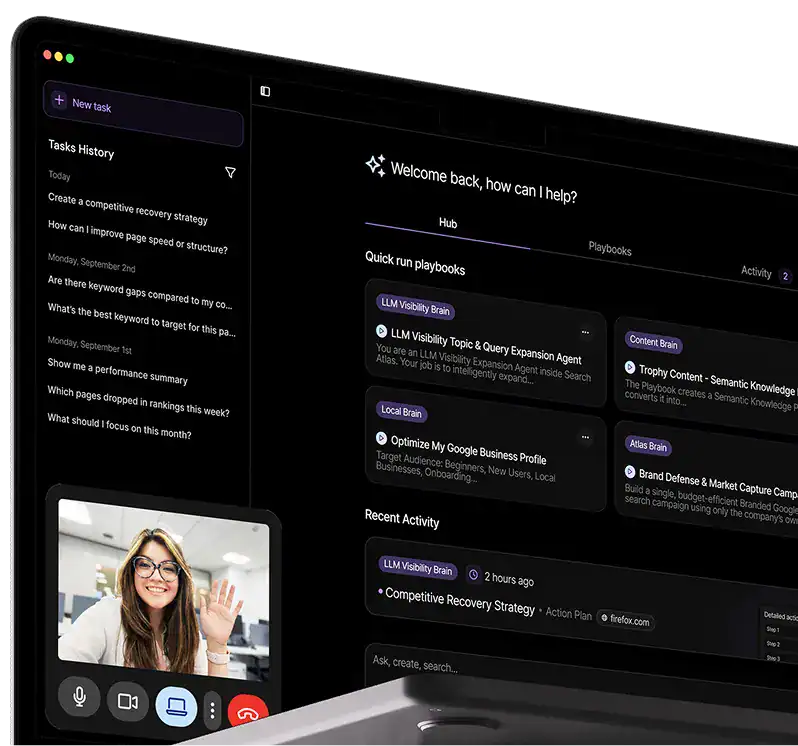
Link Building Outreach and Digital PR Tool

Do digital PR outreach at scale and deliver huge backlink results for your websites.
Find Link Prospects

Get online contact information for authoritative publishers, bloggers, and influencers in your niche (and in record time).

Perform Tailored Outreach

Use our customizable pitch templates to do large-scale link building outreach without ever leaving the dashboard.

Automate Link Building Workflows

Optimize and manage your link building workflows in a centralized place. Perfect for agencies that deliver link building at scale!
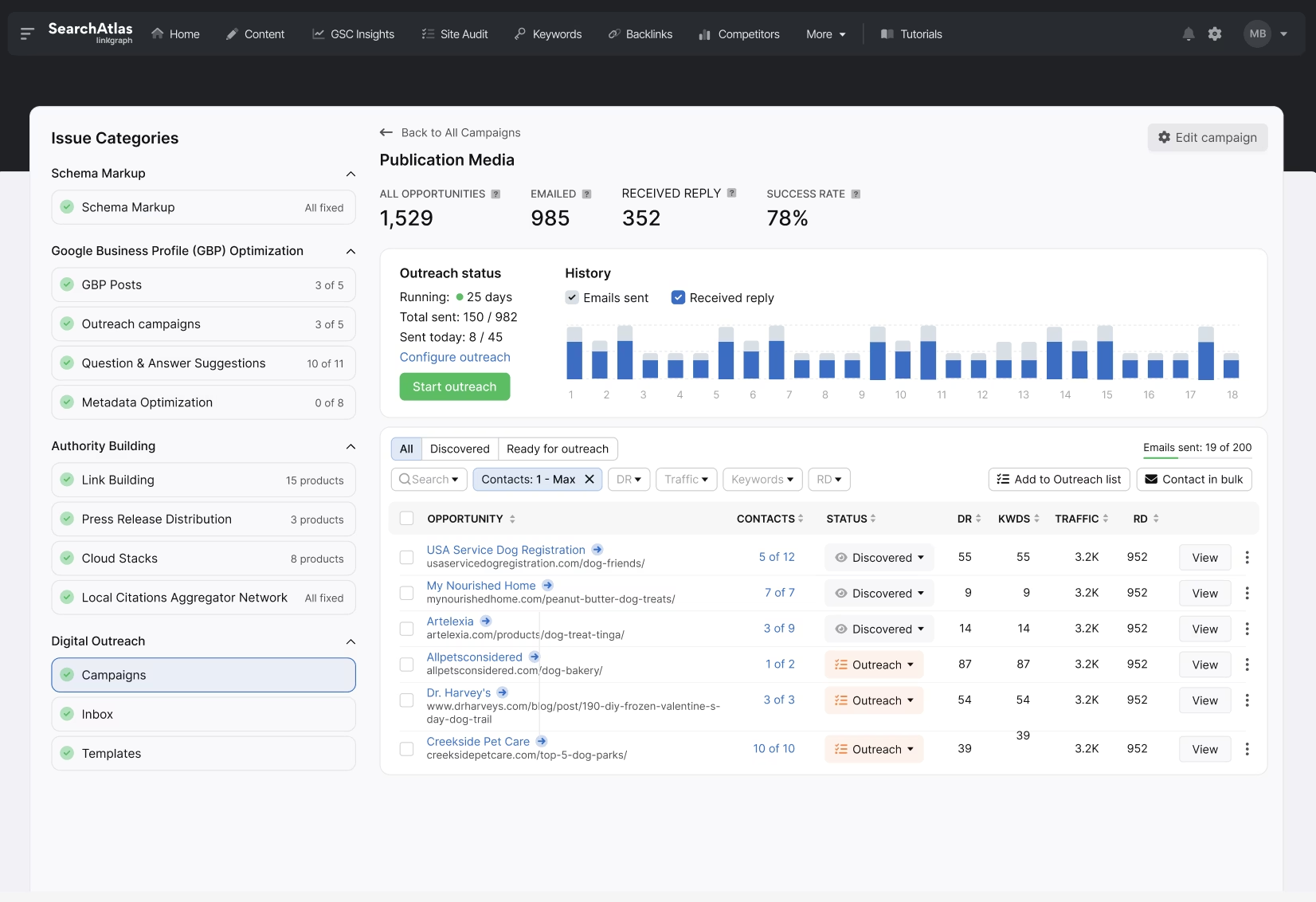
A screenshot of the Search Atlas dashboard displaying campaign performance metrics, categories, and a detailed table on the right side showcasing outreach status for Link Building efforts, contacts, and email templates.

The Largest SEO Database of Any Software Platform

100 trillion

Backlinks

500 million

Indexed Domains

5 billion

Keywords

200

Countries

Find High-Quality Link Opportunities

Enter your keywords to find publisher, blogger, and influencer prospects that fit the topical relevance of your website. Or, use the domain filters to limit link prospects to your preferred website authority and organic traffic goals. Reach out directly to link prospects from the dashboard and centralize your link building outreach for maximum efficiency!
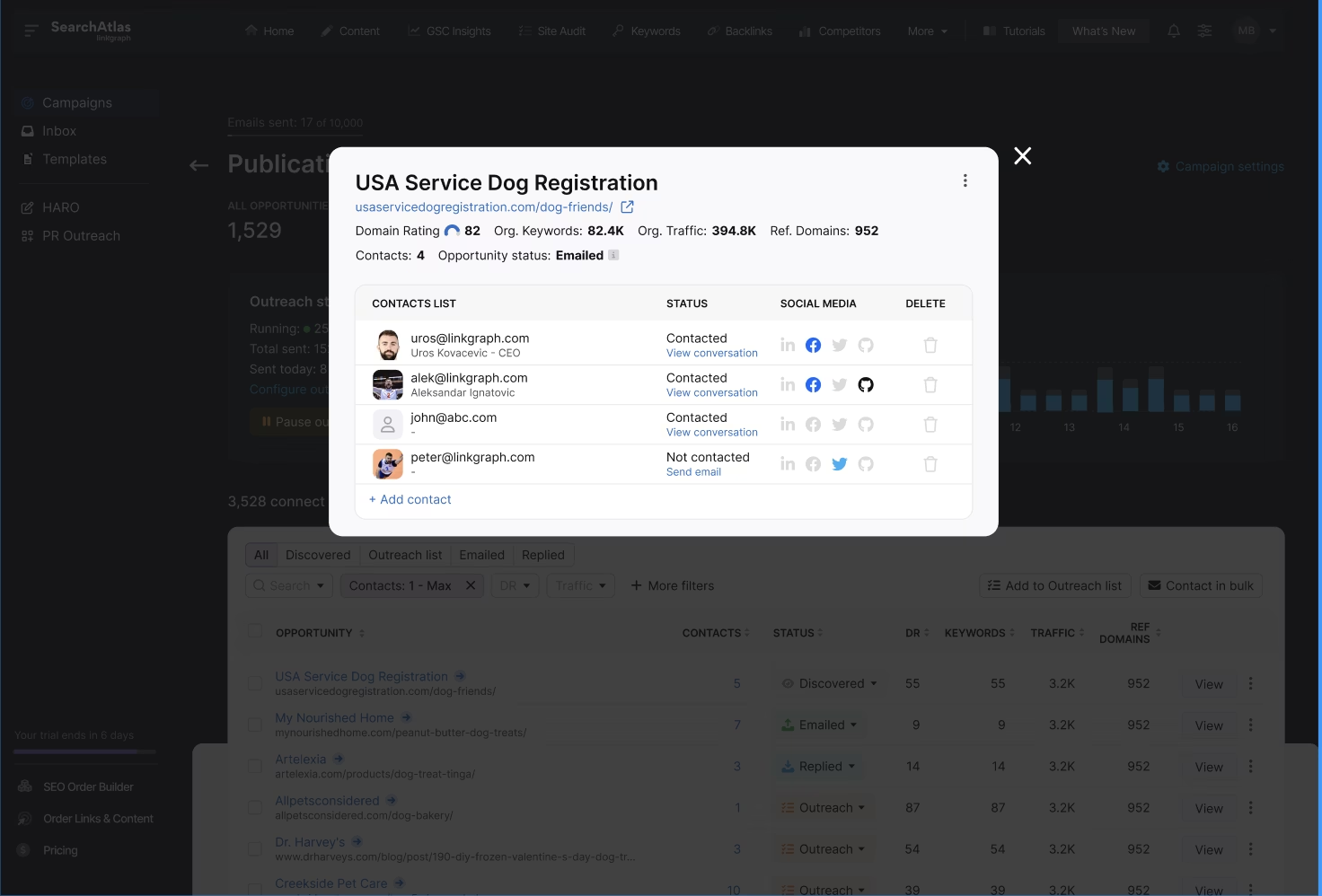
Screenshot of a USA Service Dog Registration contact list with names, statuses, and social media links. There are five entries with varying statuses including contracted and not contacted, highlighting the outreach efforts in Digital PR and Link Building campaigns.

Simplify Your Outreach with Email Templates

Need help crafting your link building pitches? Use our templates in your outreach campaigns and customize them with your website and partnership information. Or, create your pitch emails and easily reuse the most effective ones in your future outreach campaigns. Track the impact of your outreach and optimize your processes for maximum link acquisition!
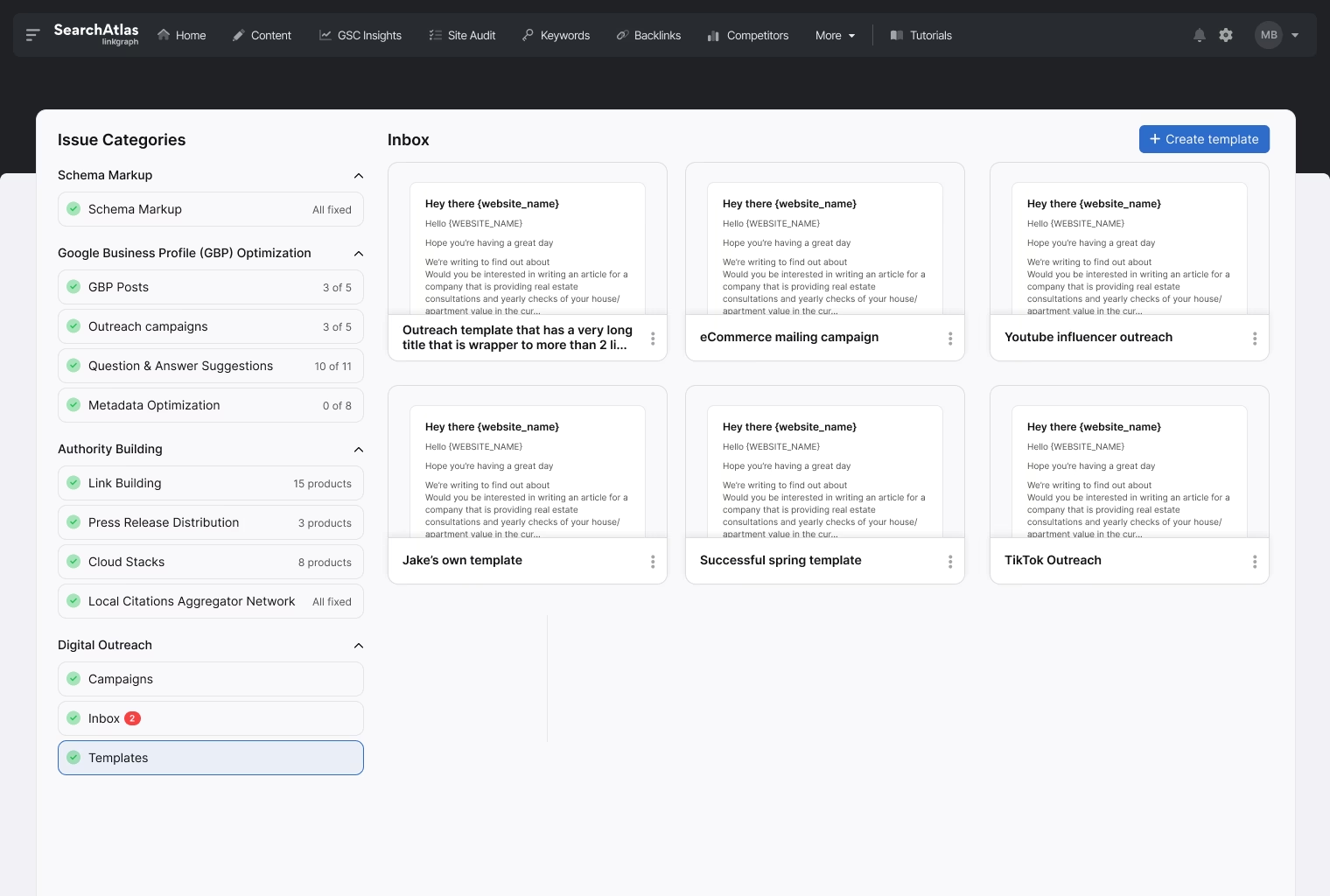
A dashboard interface showcasing various issue categories on the left column and a selection of outreach email templates in the inbox section on the right. The interface includes navigation options at the top, perfect for managing your digital PR efforts.

The Right Subscription Level for Every-sized Team

Starter

$99/ month

Perfect for

Solo marketers, freelancers, and 1-person agency teams

Everything you need to optimize your personal workflows and deliver high-performing SEO campaigns.

Exclusive Search Atlas Features
Workspace
MOST POPULAR

Growth

$199/ month

Perfect for

Scaling agencies and mid-sized businesses managing multiple sites or clients

Everything in Starter, plus more projects, higher quotas, LLM visibility tracking, and Smart Ads automation.

Exclusive Search Atlas Features
Workspace
BEST VALUE

Pro

$399/ month

Perfect for

High-volume agencies and advanced SEO teams ready to scale fast

Everything in Growth, plus all LLM models, enhanced Authority Building with more HDC, and white label capabilities.

Exclusive Search Atlas Features
Workspace

Agency

$999/ month

Perfect for

Agencies managing large client portfolios with unlimited scale and white-label capabilities

Everything in Pro, plus unlimited projects, unlimited sites, unlimited keywords, white-label reporting & client dashboards, priority support, and maximum quotas.

Exclusive Search Atlas Features
Workspace
StarterPerfect for Solo marketers, freelancers, and 1-person agency teams$99/ month

Everything you need to optimize your personal workflows and deliver high-performing SEO campaigns.

Everything you need to optimize your personal workflows and deliver high-performing SEO campaigns.

Everything in Growth, plus all LLM models, enhanced Authority Building with more HDC, and white label capabilities.

Everything in Pro, plus unlimited usage, white-label reporting, client dashboards, priority support, and max quotas.

Compare Plans by Category

Detailed feature breakdown organized by category for easy comparison

Starter

$99 / mo

Growth

$199 / mo

Pro

$399 / mo

Agency

$999 / mo

Exclusive Search Atlas Features

Atlas Brain

AI-powered search intelligence assistant

Website Studio

Build and manage websites with integrated SEO tools

Google Instant Indexing

Get new pages indexed on Google faster

Bing Instant Indexing

Get new pages indexed on Bing instantly

Cloud Stacks

Create high-authority cloud stack link networks

AI SEO Projects

AI-powered SEO projects with automated on-page optimization

1
2
4
10

Target Keywords

Keywords you can target across projects

120
300
600
1,500

Workspace

User Seats

Number of team members who can access the platform

1
3
5
10

Site Metrics

Site Explorer Projects

Number of Site Explorer projects you can manage.

5
50
100
500

Google Search Console Projects

Number of Google Search Console projects you can connect and manage.

5
15
100
999

Google Search Console: Top Keywords

Number of top-performing keywords retrieved from Google Search Console.

Unlimited
Unlimited
Unlimited
Unlimited

Google Search Console: Top Pages

Number of top pages retrieved from Google Search Console.

Unlimited
Unlimited
Unlimited
Unlimited

Google Search Console: Historical Data Limit

How far back you can view historical Google Search Console data.

Unlimited
Unlimited
Unlimited
Unlimited

Site Explorer Reports

Number of site explorer reports available per month.

175
300
500
1,000

AI SEO

AI SEO Projects

AI-powered SEO projects with automated on-page optimization

1
2
4
10

AI Quota

Monthly credits for AI-powered SEO tasks (Top up available)

500 credits (Top up available)
1,000 credits (Top up available)
2,000 credits (Top up available)
10,000 credits (Top up available)

AI Content Suite

Pages

The total number of content pages you can create.

40
100
200
500

AI Article Credits

Your monthly quota for AI-generated articles.

30
60
90
300

Content Plans

Get AI-generated content strategies and topic ideas.

40
100
200
500

CA - Standard AI

Create fast, standard AI content for your projects.

100
250
99,999
99,999

On-Page Audits

Number of on-page SEO audits

40
100
200
500

Target Keywords

Keywords you can target across projects

120
300
600
1,500

Universal CMS Publishing

Publish content directly to your CMS platforms.

1-Click Publishing

Instantly publish articles to your connected CMS.

Topical Maps

Generate a full topical map to improve SEO and rankings.

Content Planner

Plan and schedule your upcoming content in one place.

Content Genius

Use our advanced AI agent for in-depth blog article creation.

Domain Knowledge Network

Analyze your website's content structure to boost authority.

Scheduler

Automate publishing times for your content.

Micro Refiners

Enhance content quality with AI-powered refinements.

Semantic Grader (SCHOLAR)

Scholarly content analysis calculations for semantic optimization

5
10
30
100

LLM Visibility

Projects

Track brand visibility across AI models

2
4
Unlimited

User Generated Queries

Total user generated queries across all LLM projects

100
100
250

Data Refetching

How often visibility data is updated

Every 3 days
Daily
Daily

Models

Supported AI models for tracking

Local SEO

GBP Automation

Number of Google Business Profile projects you can manage.

3
10
25
100

Heatmap Tracking

Number of local heatmap pins tracked per month.

2,250/mo
5,400/mo
13,500/mo
60,000/mo

Citation Submission

Track citation quality.

Social Media Integration

Centralize social accounts and automatically share GBP posts.

Social Media Scheduler

Plan, schedule, and auto-publish posts easily.

Coming Soon
Coming Soon
Coming Soon
Coming Soon

GBP Audit

Audit your GBP to identify wins, gaps, and growth opportunities.

Coming Soon
Coming Soon
Coming Soon
Coming Soon

Site Audit

Site Auditor Projects

Number of site audit projects you can run.

5
10
100
999

Site Auditor Pages per Site

Number of pages audited per site.

10,000
10,000
10,000
100,000

Pages Crawled per Month

Total pages crawled each month across all sites.

50,000
100,000
10,000,000
100,000,000

PageSpeed Insights Pages

Number of PageSpeed analysis requests available per month.

200
500
2,000
10,000

JS Rendering

Ensures accurate auditing of modern, dynamic websites by executing JavaScript just like a search engine bot. For your convenience, this is automatically enabled for all OTTO project audits across all plans.

Live Crawl Logs

Gain real-time transparency into your site audit with a live data stream. Monitor the crawler’s progress as it happens and see the immediate HTTP status of every page being processed.

Page Pruning

Optimize your crawl budget and SEO authority. Identifies low-value or “thin” content and provides actionable recommendations to remove (prune) underperforming pages or enrich them for better rankings.

Real-time Site Monitoring

Get instant email alerts for technical issues found on your domain. Automated detection and prioritized fix recommendations help protect your rankings in real time.

GSC & GA4 Data Integration

Sync Google Search Console and GA4 data directly into your audit. Prioritize SEO fixes based on real-world performance, including clicks, sessions, and user engagement.

Rank Tracking

Keyword Rank Tracker Projects

Number of rank tracking projects.

20
50
Unlimited
Unlimited

Keyword Data Refreshes

Number of keyword data refreshes for monitoring SEO performance.

2,000/mo
3,500/mo
5,000/mo
50,000/mo

Smart Ads

Google Ads Reporting

View Google Ads performance data in reports.

Google AI Campaign Generation and Publishing

Create high performing campaigns instantly with AI optimized keyword and structure strategies.

7 days free trial
10
10
Unlimited

Automated Negative Keywords

AI removes irrelevant search terms to reduce wasted spend and improve efficiency.

7 days free trial

Google Ads Management Dashboard

View all your campaigns, metrics, insights, and optimization opportunities in one place.

7 days free trial

AI PPC Landing Pages Generator

Generate conversion optimized landing pages automatically for your ads.

Coming Soon
Coming Soon
Coming Soon
Coming Soon

Authority Building

Press Release Distribution

Distribute press releases to major news outlets and media sites.

+ 100s of other channels

+ 100s of other channels

+ 100s of other channels

+ 100s of other channels

Digital PR Outreach

Number of PR outreach campaigns per month

2
10
30
999

ChatGPT Citation Outreach (QUEST)

Quality and authority score calculations for ChatGPT citations.

5
10
30
100

Access to Cloud Stacks

Full access to Cloud Stacks feature for authority building.

Access to Indexer

Full access to URL indexing feature

Access to LinkLaboratory Exchange

Access to the LinkLaboratory link exchange platform

Access to WILDFIRE

Access to WILDFIRE viral content distribution

Hyperdrive Credits

1 HDC = $1; used for PRs, Cloud Stacks, Publisher Exchange. Updated monthly.

0
15
30
100

Indexer Credits

Used to submit URLs through our two-layer indexer system

1
5
10
50

Backlink Analysis

Total Referring Domains

Number of unique referring domains tracked

3,000
25,000
25,000
100,000

Competitors per Project

Number of competitor sites you can compare per project

1
4
4
10

Backlink Projects

Number of backlink tracking projects you can manage

2
5
5
100

Backlink Researches

Maximum number of backlinks analyzed across projects

50,000
500,000
500,000
500,000

Backlink Gap Analysis Tool

Analyze backlink gaps between your site and competitors

Keyword Research

Keyword Lookups

Number of keyword searches you can perform

500
2,000
5,000
100,000

Weekly Lookups

Number of keyword searches available per week

175
500
1,000
25,000

Competitor Gap Analysis

Number of competitor keyword gaps you can analyze

2,000
200,000
500,000
500,000

Bulk Analysis URLs

Number of URLs you can analyze in bulk for keyword overlap

0
2,000
5,000
25,000

Keyword Gap Analysis Tool

Analyze keyword gaps between your site and competitors

Outreach & Digital PR

Sent Emails

Number of outreach emails you can send per month

5,000
25,000
75,000
100,000

Campaigns

Number of active outreach campaigns you can run

20
50
150
1,000

Connected Email Accounts

Number of email accounts you can connect for outreach

2
100,000
100,000
100,000

Tools & Extensions

Chrome Extension Access

Access to Search Atlas Chrome Extension

Bulk DA Checker Lookups

Number of daily domain authority checks available

200/day
400/day
800/day
1,000/day

Reporting & Analytics

Reports

Create unlimited custom reports

Unlimited
Unlimited
Unlimited
Unlimited

Data Connections

All platform integrations available

White Label

Branded Dashboard

Custom logo, colors, and domain

Client Portal

Personalized client login portal

Reports & Dashboards

White-labeled reporting

Priority Support

Dedicated support team

Client Accounts

Unlimited client accounts

Access Controls

Role-based permissions

Partner Training

Exclusive training and updates

Custom Enterprise Plans Available

Built for large organizations with complex SEO needs and big growth goals. Get personalized onboarding, dedicated support, and full-feature access tailored to your setup.

Add More AI Power to Every Campaign

Supercharge your Search Atlas plan with OTTO’s scalable AI marketing activations for multi-site growth.

97%

Pins improved

390X

Organic Traffic Growth

96%

More keywords ranking

What Is OTTO SEO™?

Screenshot by OTTO SEO grader

OTTO SEO by Search Atlas is an AI agent that runs your full search strategy in real time—technical fixes, on-page updates, content, link building, press releases, digital PR, and local SEO.

It analyzes your site and competitors using data from Google Analytics, Search Console, and Google Business Profile to guide every optimization.

You stay in control—deploy automations or approve changes individually, customize AI usage, and keep all edits even after cancellation.

How many websites need the power of OTTO?

Starter

$99 per site

Per month

Basic

$85 per site

Per month

STANDARD

$69 per site

Per month

Plus

$59 per site

Per month

Premium

$49 per site

Per month

Enterprise

Custom Pricing

Per month

Want to earn more high-quality backlinks? Start a free trial.

Optimize your Link Building Outreach Workflows

Campaign Management

Manage multiple link building campaigns in the same dashboard. Great for agencies that provide link building deliverables!

High-Quality Opportunities

Find the highest-quality linking opportunities. Search for link prospects by keyword or domain authority levels.

Full Contact Information

Get accurate, up-to-date contact information for your link prospects. Reach out immediately without ever leaving the dashboard!

Customizable Templates

Use our customizable pitching templates in your outreach. Or, create your own and save for future campaigns!

Centralized Outreach

Manage outreach and follow-up opportunities in the same place. Stop jumping between emails and optimize your team workflows.

Link Building Tracking

Track the progress of your campaigns and know which link building pitches and partnerships deliver the best results.

Centralize Your Link Building Outreach to the Same Place

Centralize all of your link building outreach emails to the same place. Send pitches and follow-up emails directly in the dashboard. Know which email threads belong to which campaigns or clients. If your agency does link building outreach at scale, Search Atlas is the perfect platform to organize and optimize your agency’s link building workflows. 
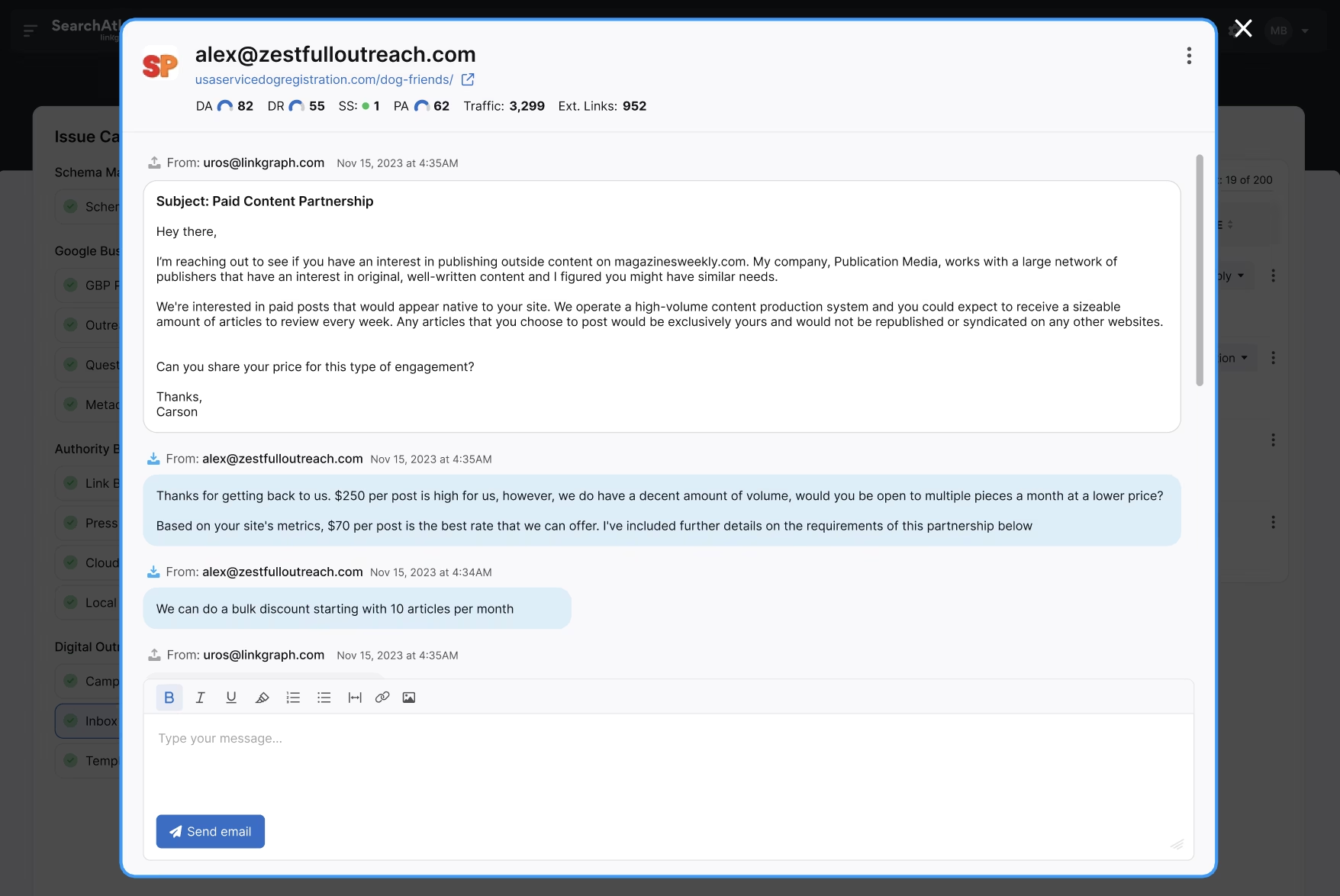
Screenshot of an email conversation discussing a paid content partnership. The client negotiates the cost per blog post, mentions bulk discounts, and outlines their publishing frequencies and requirements related to Link Building.

Manage Multiple Link Building Campaigns with Ease

Easily navigate between client campaigns and keep your link building outreach organized. If you’re a marketing agency that needs to send thousands of outreach pitches monthly, Search Atlas is the ideal tool for maximizing your outreach efforts and saving time and resources. With multiple seats available for a monthly subscription, you’ll get your entire team on track to start delivering better results for your clients.
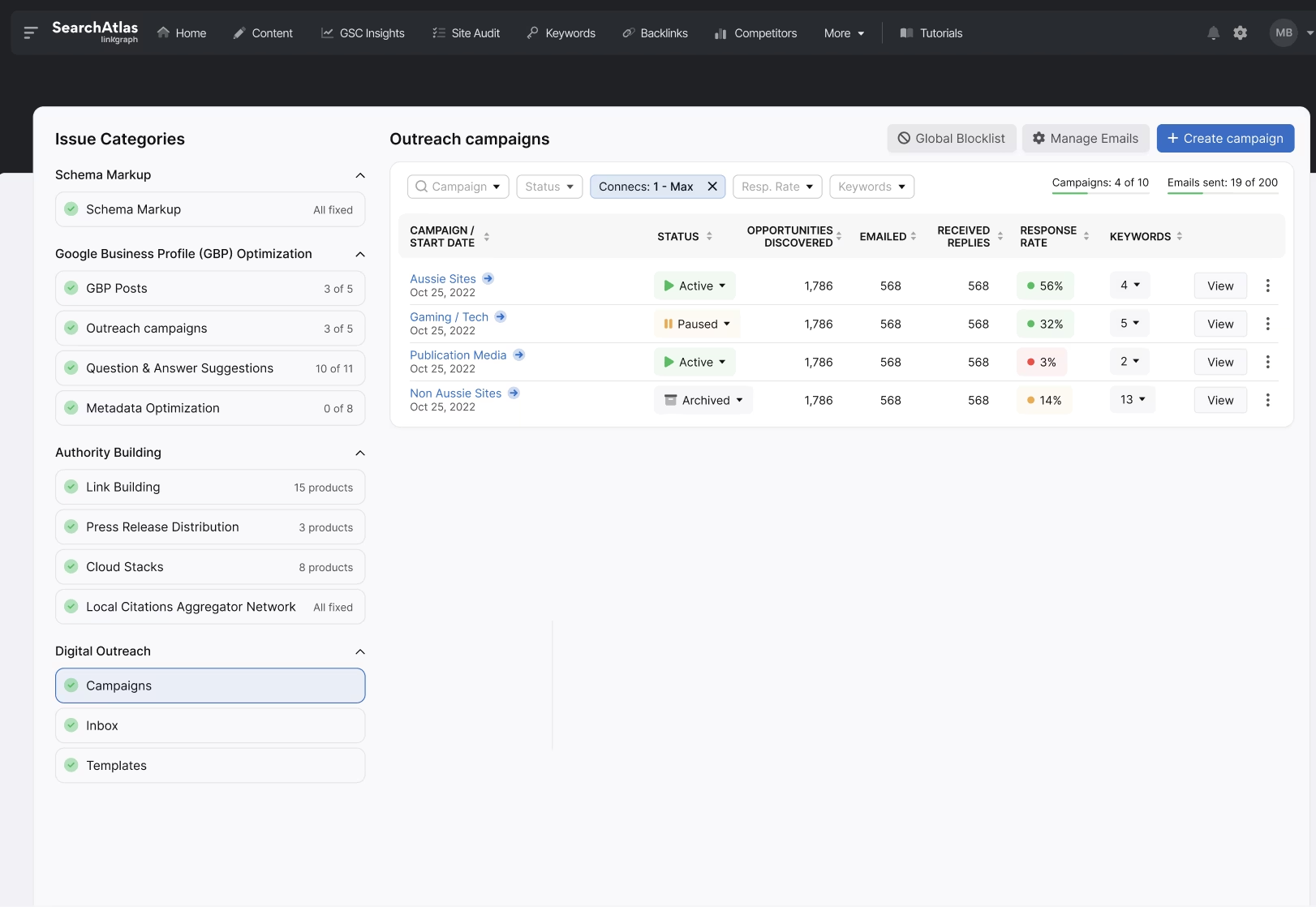

A software dashboard showing various outreach campaigns with details such as status, emails sent, opportunities created, and links gained. The left panel features issue categories and automation options for seamless link building and digital PR efforts.

You are the Center of Our Universe

Over 5,000 agencies trust Search Atlas

stars

Lisa Parziale

Founder at AgencyRemix
Source: Search Atlas reviews
"I used to pay for lots of different software for my SEO business and customer reporting. Search Atlas made this much easier and more affordable for me."
stars

Clayton Joyner

Founder At Modern io Digital
Source: Search Atlas reviews
”Search Atlas Boosted Our Organic Lead Traffic by 110% in just 90 Days! It saves us money, time, and performance.“
stars

Josh Blakeley

Founder & CEO JBL Digital Marketing
Source: Search Atlas reviews
"Search Atlas just blows other tools out of the water. Tools like Ahrefs and Jasper have gone up in price quite a bit and just haven’t kept up. Search Atlas replaces both of them. "
stars

Shannon Donovan

Founder @Small Biz Drs. LLC
Source: Search Atlas reviews
“We were using many different tools to accomplish what we can do in Search Atlas.“
stars

Mike Anderson

Owner @Aim High Digital
Source: Search Atlas reviews
“Search Atlas transformed my agency workflow, allowed rapid creation of hundreds of articles!“
stars

Jake Tlapek

Founder @Wizard Marketing
Source: Search Atlas reviews
“This tool is going to help you make actionable, realizable changes to your SEO and get the traffic you deserve.“

Scale your agency’s link building services and revenue. Get started now.

How to Do Link Building Outreach with Search Atlas

#1. Begin a New Outreach Campaign in your OTTO Project

Once you have activated OTTO for your client project, navigate to the “Digital Outreach,” tab. Then, select “Campaigns,” from the left-side menu. In the top right-hand corner, click the “+ New Campaign” button. (Note: You can also access a stand alone version of the Digital PR tool in your Search Atlas navigation menu. Select “More,” then click “Digital PR.”)
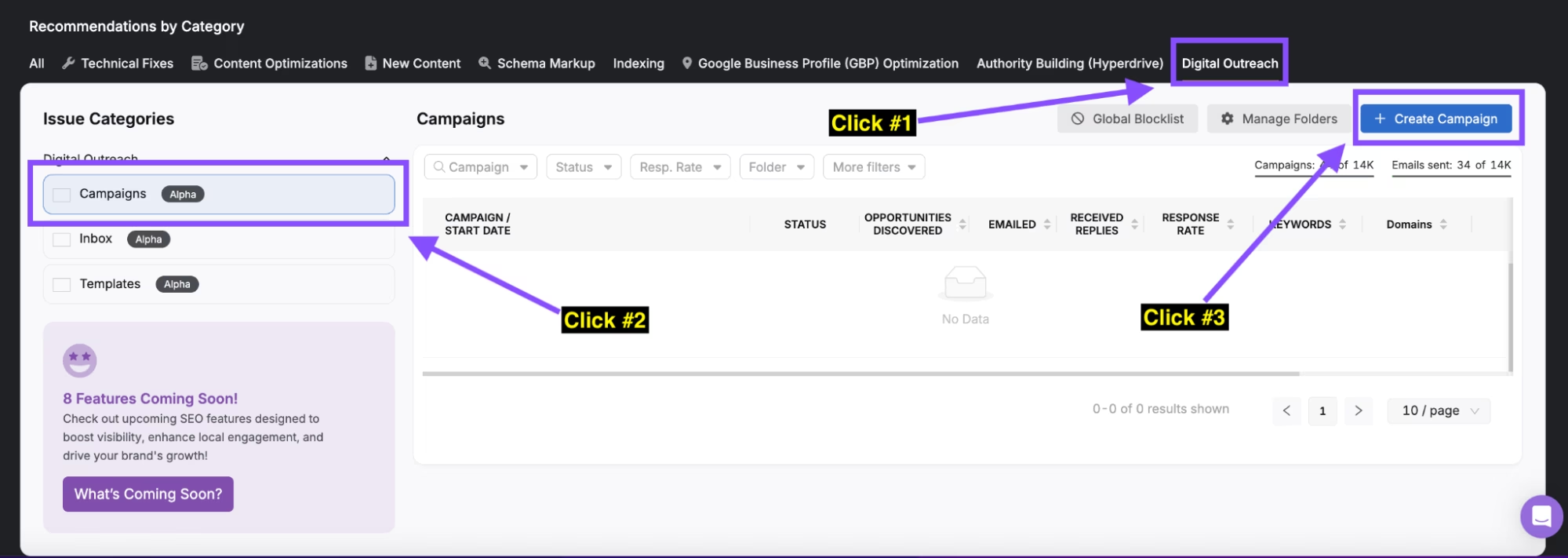
Screenshot of a user interface showing the "Digital Outreach" section. Instructions highlight the steps: click "Campaigns," then "Create Campaign" to start your new digital PR campaign.

#2. Choose Settings for your Link Prospects

Give your campaign a name and select the appropriate Project folder. Then, choose whether you want to search for link prospects using keywords or domains. If you need keyword suggestions, type a term into the provided text box and click “populate.” Next, use the filters to determine your preferred location, TLD, Domain Rating, Traffic, or total keyword preferences for link prospects. If you have any websites that you don’t want included in your outreach list, add them to the “Blacklist” box. Then, click “Next Step.”
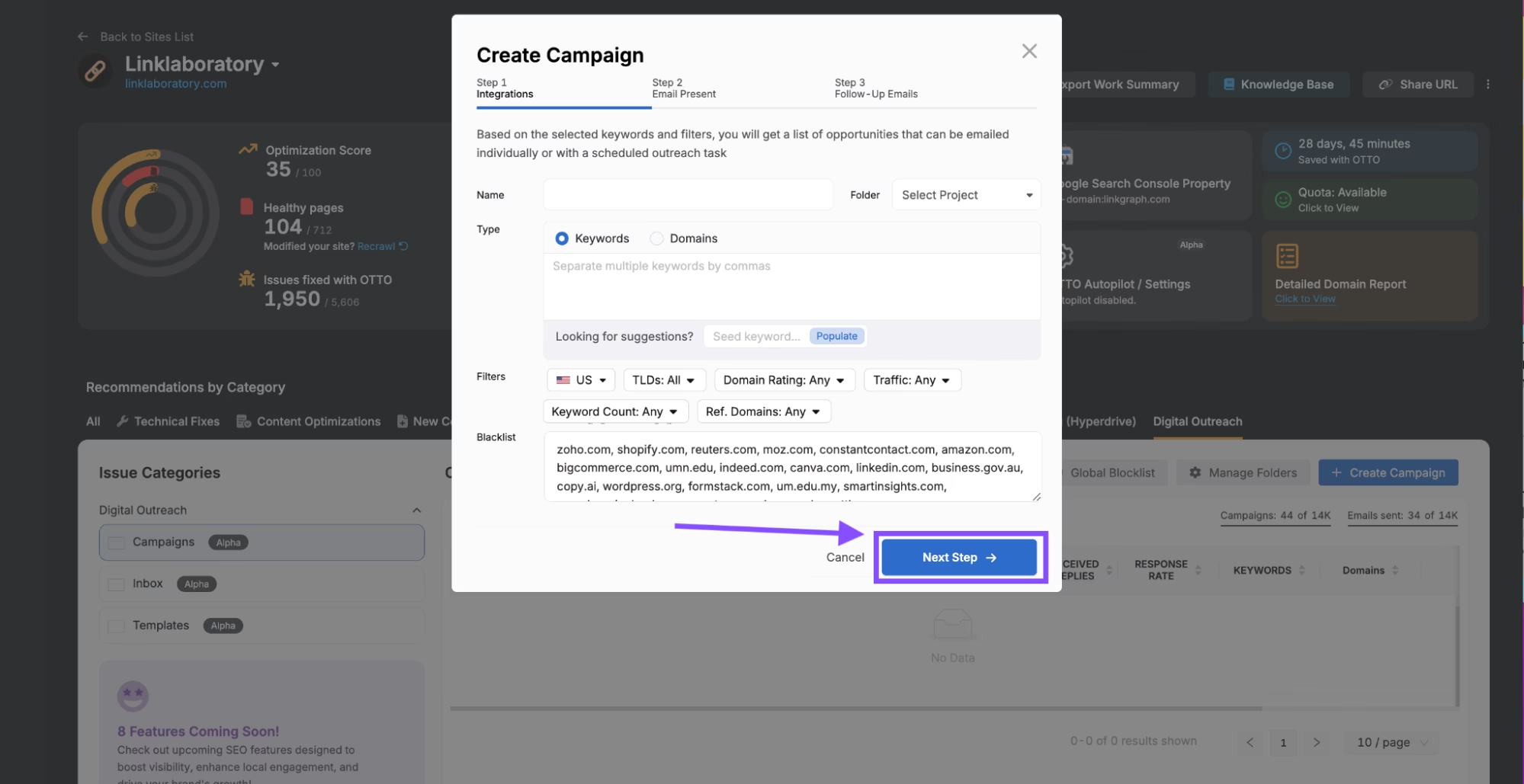
Screenshot of a marketing platform with a pop-up window titled "Create Campaign" showing options and a "Next Step" button highlighted by an arrow. The background showcases various other features, including tools for outreach and digital PR.

#3. Create Your Email Pitch or Select from Templates

Use the “Sender,” dropdown to select an email to send outreach emails from. Then, give your outreach email a subject line. You can write your own pitch in the “Body” text box, or, click “View existing templates,” to use an existing template. Make sure to modify the template to match your website information and outreach requests. Once completed, click “Next Step.”
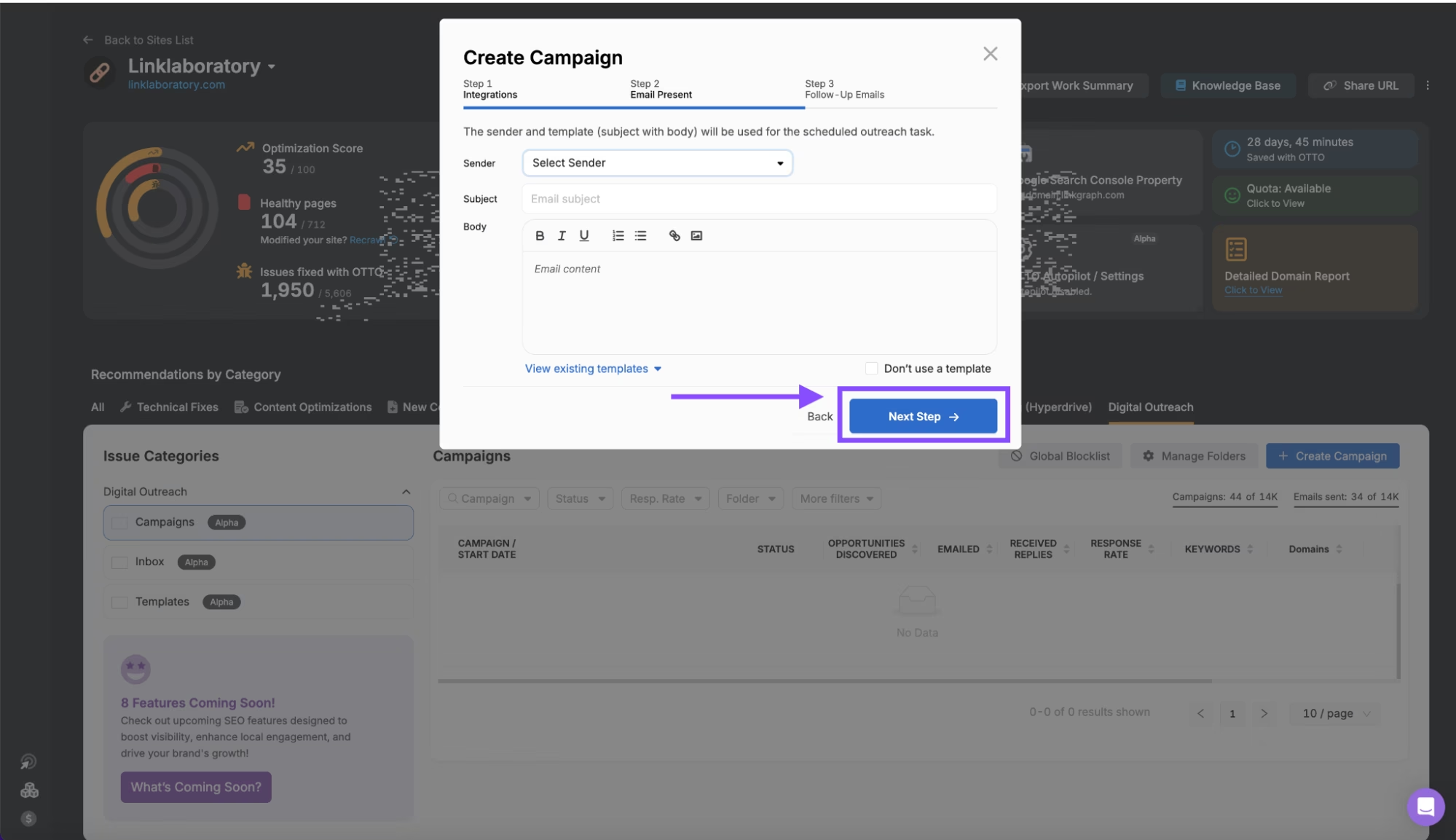
A campaign creation window with sender and recipient details is displayed. A highlighted "Next Step ->" button at the bottom of the window awaits your click, guiding you through the next stages of digital PR.

#4. Determine Follow-Up Emails and Create a Campaign

Some link prospects may not respond to your initial outreach email. For this reason, it can be good to send follow-up emails to confirm they reviewed your initial pitch. Choose whether you want to send follow-up emails or opt-out. Then, click “Create Campaign.”
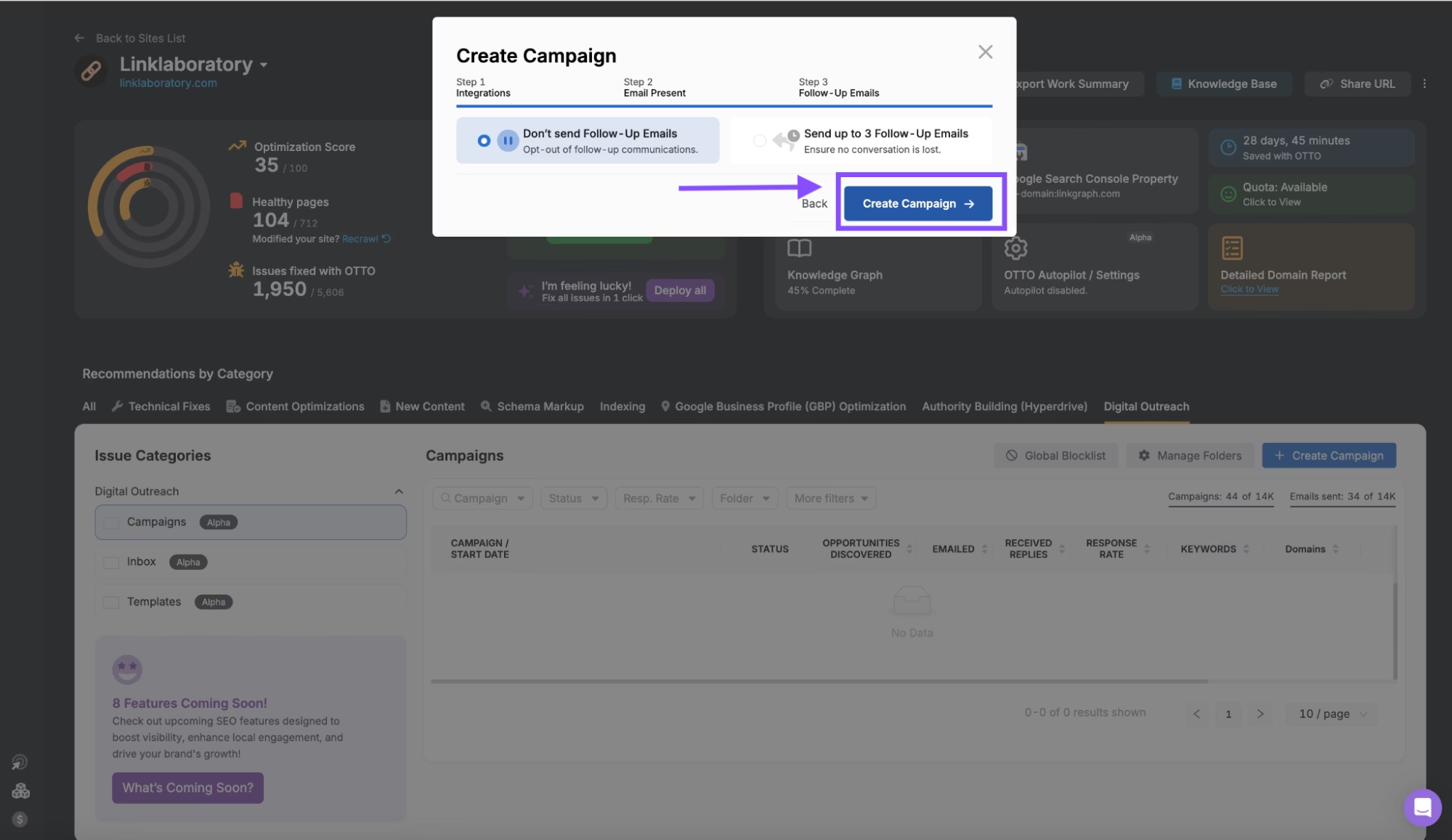
A screenshot of a web interface for creating a campaign, highlighting options for sending follow-up emails and a prominently displayed "Create Campaign" button with an arrow pointing to it. This tool is perfect for orchestrating your outreach strategy and enhancing your digital PR efforts.

#5. Explore Links Prospects

Once your campaign is created, you’ll receive a list of websites that may be worth reaching out to. Review their DR, Keyword, and traffic metrics to confirm the quality and relevance of the suggested website. Then, click on the website or contacts column to see a list of contacts that you can reach out to about a potential link partnership. Use the status column to track whether or not you have reached out to a website. Or, click “Start Outreach,” to begin reaching out to the websites in the list.

A screenshot of the Search Atlas dashboard displaying campaign performance metrics, categories, and a detailed table on the right side showcasing outreach status for Link Building efforts, contacts, and email templates.

#6. Reach Out to Individual Contacts

You can also select from the list of discovered contacts by clicking on the blue numbers in the “Contacts” column. You’ll see a list of emails and links to social media profiles of the contacts. Click “Email Contacts Now,” to begin drafting an outreach email. Or, click “Add to ‘Ready for Outreach’ list,” to add to an email list to reference later on.
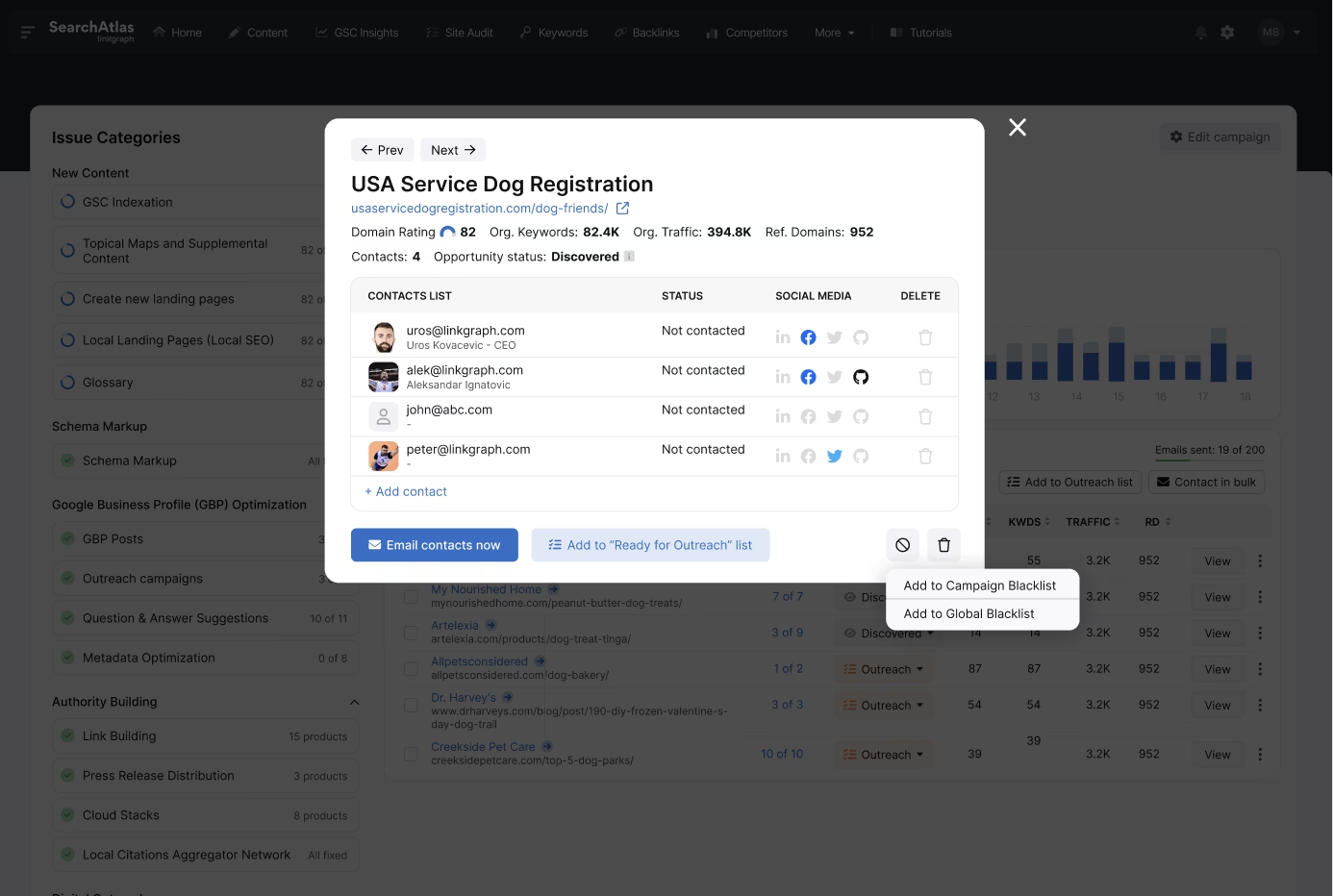
A user interface showing contact management for a project named "USA Service Dog Registration" with options to contact, add contacts, and manage blacklists. In the background, there is a data analytics dashboard to assist with outreach and link building efforts.

#7. Manage Emails and Replies in Your Dashboard Inbox

Manage all of your outreach communication by clicking “Inbox” from the left side menu. You’ll see a list of your outreach emails as well as any replies (if received). Track milestones with your outreach in the “Milestone,” column, and keep track of any follow-up emails sent or backlinks earned directly in your dashboard.
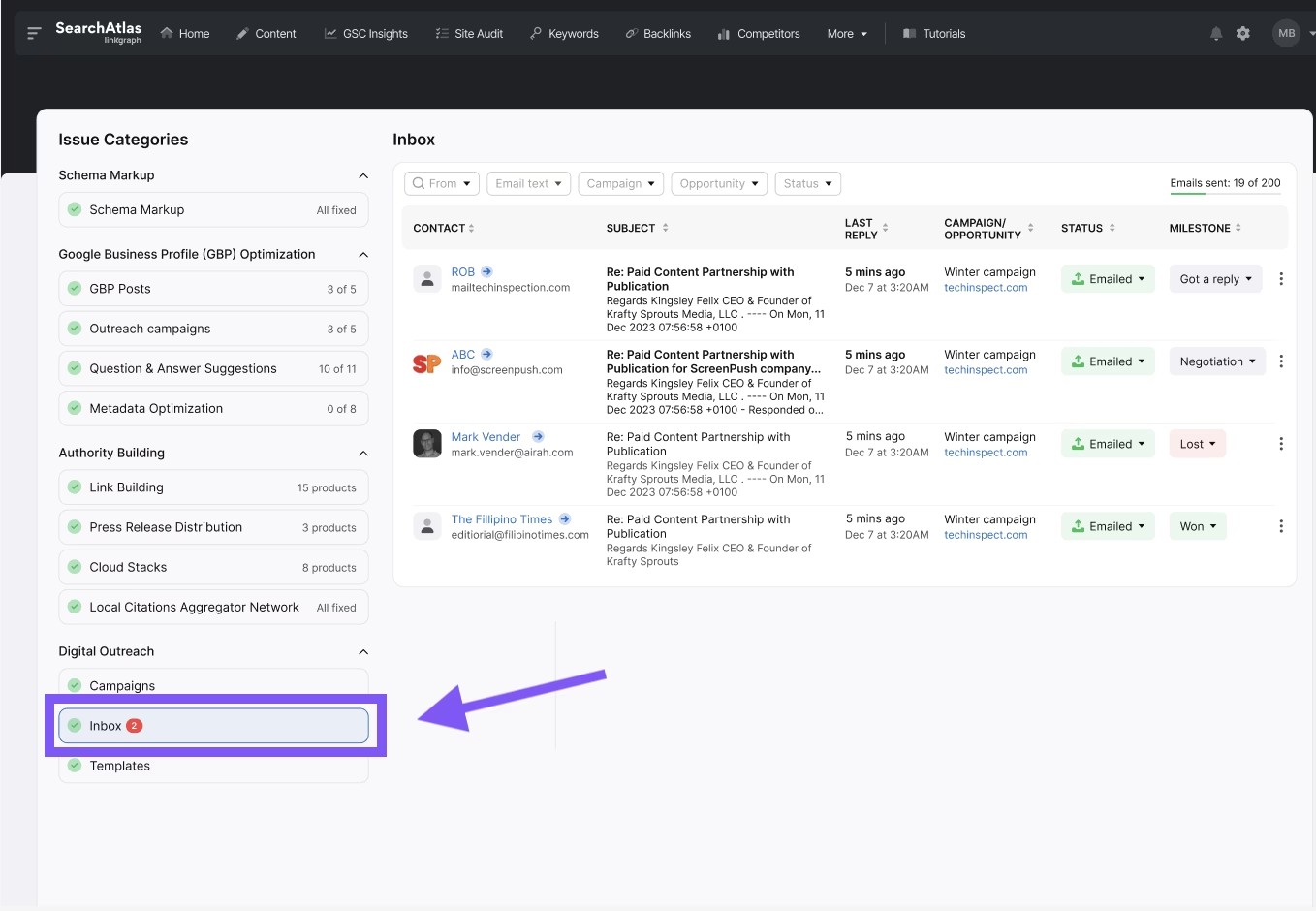
A screenshot of a Search Atlas dashboard showing issue categories on the left, with "Inbox" highlighted by an arrow. The Inbox displays various link building and digital outreach campaigns and their statuses.

Based on 3,200+ Reviews:

The #1 Organic Marketing Platform for SEO, Content Marketing, and Digital PR Professionals

Question 1 of 3 33%

How many people are on your team?