Gemini Agents, Google’s advanced AI models, are designed for multi-step task automation and proactive user assistance, leveraging Gemini 3 Pro for enhanced reasoning and multimodal understanding. This technology is rolling out to Google AI Ultra subscribers in the US, with individual plans ranging from $7.99 to $249.99 per month and enterprise solutions at $21-$30 per person per month. Key capabilities include a 1 million-token context window (expanding to 2 million), enabling processing of over 700K words of text or 800K tokens of video in a single session. The Deep Research Agent, accessible via API, reduces research time from weeks to minutes, with a Kärcher case study demonstrating a 90% reduction in drafting time.
The agentic era, ushered in by Gemini 2.0, signifies a shift from reactive AI to proactive digital teammates. Project Mariner, an early research prototype, achieved 83.5% on the WebVoyager benchmark for real-world web tasks. The Gemini CLI, open-sourced in June 2025, aims for 100x productivity. Despite these advancements, trust in fully autonomous AI agents declined from 43% to 27% in 12 months, with only 2% of organizations implementing AI agents at scale, though 65% are piloting or exploring deployment. The global market for AI agents is projected to reach $450 billion by 2028.
While offering significant benefits like multimodal reasoning and advanced tool use, Gemini Agents present challenges in accuracy and reliability, with developers describing Gemini 3.0 Pro as “frustrating” and “erratic.” Security and privacy risks are also noted, as agent-style workflows create invisible access paths across Workspace assets, potentially expanding data exposure if permissions are not robust. Google’s pilot program from late 2023 to late 2024 demonstrated a 40% reduction in mobile invalid traffic using Gemini to combat ad fraud, yet human review of conversations remains a privacy concern for enterprise data.
What is Gemini Agents?
Gemini Agents are AI models designed to understand the world, think multiple steps ahead, and take action on a user’s behalf, characterized by their ability to handle complex, multi-step tasks from start to finish with user supervision. Gemini Agents represent the next step in building towards a universal AI assistant, navigating the complexities of daily tasks while keeping the user in control.
Gemini Agents emerged as an experimental feature within Gemini Apps, designed to automate complex, multi-step tasks across various applications and web services. Gemini Agents are entities that users can direct to perceive their environment, make decisions, and take actions to achieve specific goals. Gemini Agents are built on Gemini 2.0’s advancements in multimodality and native tool use, with further development leveraging Gemini 3 Pro.
As a type of AI assistant, Gemini Agents belong to the broader category of autonomous AI systems. Gemini Agents are distinguished from simpler AI assistants by their advanced planning capabilities and ability to execute multi-step tasks across various applications and web services. Gemini Agents share characteristics with other intelligent agents that perceive environments and take actions, but Gemini Agents emphasize user supervision and integration with Google’s ecosystem.
Specific Gemini Agent types include:
- Gemini Agent (for personal use): Manages multi-step tasks like email categorization, drafting replies, scheduling, and web interactions such as making reservations or placing orders. This agent type is available with a Google AI Ultra subscription and is rolling out to subscribers in the US with language set to English.
- Gemini Enterprise Agents (Google-Made): These agents, such as the Deep Research Agent and Data Insights Agent, are designed for business use cases. Gemini Enterprise Agents perform deep research, generate comprehensive reports, provide data insights without SQL knowledge, and accelerate team knowledge sharing.
- Gemini Deep Research Agent (via API): Autonomously plans, executes, and synthesizes multi-step research tasks, utilizing web search and user-provided data to generate detailed, cited reports. This agent is accessible via the Interactions API in Google AI Studio and the Gemini API, with research tasks taking several minutes to complete.
- Gemini Code Assist (Agent Mode): Helps developers with coding tasks across the software development lifecycle within IDEs like VS Code and IntelliJ. Gemini Code Assist generates code from design documents, answers questions about code, and improves generated content using context and built-in tools.
- Google Workspace Studio Agents: Automate everyday work, from simple tasks to complex workflows, without requiring coding. These agents reason, understand context, and handle repetitive tasks like sifting through emails, managing calendars, and generating personalized content.
Main attributes of Gemini Agents include:
1. Multimodal Reasoning: Gemini Agents leverage Gemini 2.0’s advancements in multimodality, processing and generating native image and audio output. Gemini Agents utilize multimodal reasoning to understand complex instructions and environments, enhancing their ability to interact with diverse data types.
2. Long Context Understanding: Gemini Agents are built on Gemini models with large context windows, up to 1 million tokens currently, with 2 million tokens coming soon for Gemini 2.5. This allows Gemini Agents to understand and process extensive information, enabling them to handle complex, multi-step tasks requiring deep contextual awareness.
3. User Supervision and Control: Gemini Agents are designed with user confirmation before critical actions, such as sending emails or making purchases. Gemini Agents allow users to stop or take control at any time, ensuring user oversight and mitigating risks associated with autonomous actions.
Gemini Agents form a comprehensive ecosystem of AI capabilities:
Dependencies: Gemini Agents leverage Google’s Gemini 3 Pro model, Google apps like Gmail, Calendar, and Drive, and open-source frameworks such as LangGraph, CrewAI, LlamaIndex, and Composio for custom agent building. Gemini Agents rely on advanced features like native user interface action-capabilities and compositional function-calling.
Enablement: Gemini Agents enable automation of complex, multi-step tasks, deep research capabilities, and personalized assistance across various applications and web services. Gemini Agents make possible significant reductions in research time, such as the Kärcher case study reducing drafting time by 90%.
Competition: Gemini Agents compete with other AI assistants and automation platforms, distinguishing themselves through deep integration with Google’s ecosystem and advanced multimodal reasoning. Gemini Agents offer an alternative to manual execution of multi-step digital tasks and traditional scripting or RPA solutions.
Gemini Agents are rolling out to business customers and personal users, with the personal Gemini Agent available to Google AI Ultra subscribers in the US. The global market for AI agents is projected to grow significantly, with Gemini Agents positioned to capture a substantial share due to their integration with Google’s services. Gemini Agents are designed to automate tasks like email management, scheduling, web research, and online transactions, with specific enterprise agents reducing research time from weeks to hours.
What is the price of Gemini Agents?
$7.99 per month is the minimum cost for Gemini Agent capabilities, specifically for the Google AI Plus Plan, which includes “agentic capabilities in AI Mode (US only) Limited.” The maximum cost for a single user is $249.99 per month for the Google AI Ultra Plan, which provides “Gemini Agent (US only, English only)” and “Project Mariner (early access).” Enterprise-level pricing starts at $21 per person per month for Gemini Business and $30 per person per month for Gemini Enterprise.
Google AI plans for individuals and developers offer agentic features across various tiers. The Google AI Plus Plan costs $7.99 per month, or $3.99 per month for 2 months (60 days), and includes limited access to Jules and Google Antigravity. The Google AI Pro Plan costs $19.99 per month, with the first month free (30 days), or is free for students, providing expanded access to Jules and higher rate limits for the agent model in Google Antigravity. The Google AI Ultra Plan costs $249.99 per month, or $124.99 per month for 3 months (90 days), and includes the highest access to Jules, Google Antigravity, and Chrome Auto Browse.
Enterprise and business subscriptions for organizations offer agent capabilities with different feature sets. Gemini Business costs $21 per person per month, targeting smaller companies and providing access to Gemini models. Gemini Enterprise costs $30 per person per month, targeting large organizations, and includes access to the latest Gemini models, no-code and low-code tools for building custom agents, pre-built agents, and an “agent finder.” Current Agentspace clients receive free upgrades to Gemini Enterprise or Gemini Business through their existing contracts.
Agent usage costs for developers are calculated based on underlying token consumption and tool usage. Gemini Deep Research Agent model inference charges at standard Gemini 3 Pro list rates for all tokens (input, output, intermediate). Tool usage fees apply per existing pricing structures, with search grounding excluding retrieved tokens from fees, while Url_context and File Search include retrieved tokens in fees. Gemini Code Assist Standard costs $0.031232877 per hour with a monthly commitment, or $0.026027397 per hour with a 12-month (365-day) commitment. Gemini Code Assist Enterprise costs $0.073972603 per hour with a monthly commitment, or $0.061643836 per hour with a 12-month commitment.
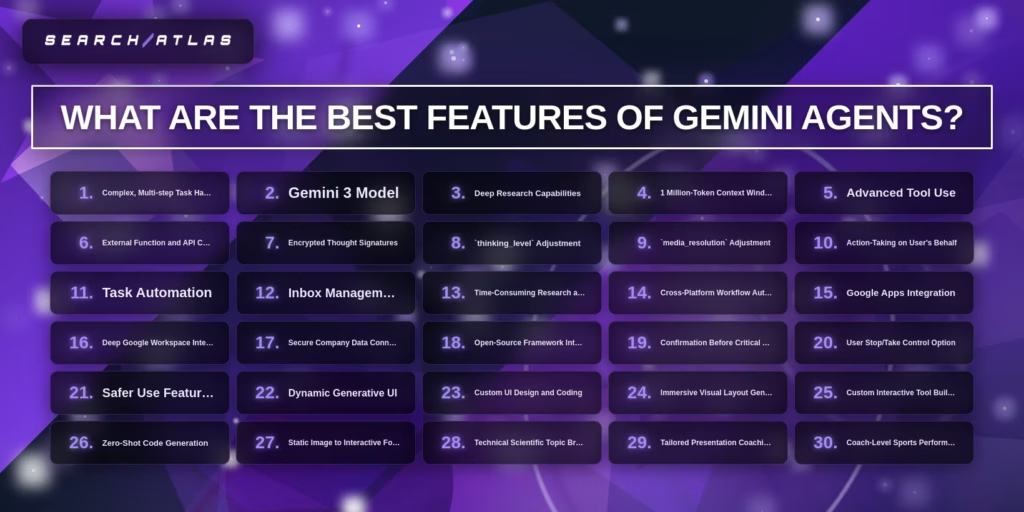
What are the Best Features of Gemini Agents?
The best features of Gemini Agents include:
- Complex, Multi-step Task Handling (Core Capability)
- Gemini 3 Model (Underlying Technology)
- Deep Research Capabilities (Core Capability)
- 1 Million-Token Context Window (Core Capability)
- Advanced Tool Use (Core Capability)
- External Function and API Calling (Core Capability)
- Encrypted Thought Signatures (Core Capability)
- thinking_level Adjustment (Core Capability)
- media_resolution Adjustment (Core Capability)
- Action-Taking on User’s Behalf (Action-Taking Capability)
- Task Automation (Action-Taking Capability)
- Inbox Management (Action-Taking Capability)
- Time-Consuming Research and Live Web Browsing (Action-Taking Capability)
- Cross-Platform Workflow Automation (Action-Taking Capability)
- Google Apps Integration (Integration Feature)
- Deep Google Workspace Integration (Integration Feature)
- Secure Company Data Connection (Integration Feature)
- Open-Source Framework Integration (Integration Feature)
- Confirmation Before Critical Actions (User Control Feature)
- User Stop/Take Control Option (User Control Feature)
- Safer Use Features (User Control Feature)
- Dynamic Generative UI (Generative Capability)
- Custom UI Design and Coding (Generative Capability)
- Immersive Visual Layout Generation (Generative Capability)
- Custom Interactive Tool Building (Generative Capability)
- Zero-Shot Code Generation (Generative Capability)
- Static Image to Interactive Format Translation (Generative Capability)
- Technical Scientific Topic Breakdown (Learning & Coaching Feature)
- Tailored Presentation Coaching (Learning & Coaching Feature)
- Coach-Level Sports Performance Advice (Learning & Coaching Feature)
1. Complex, Multi-step Task Handling
Complex, multi-step task handling is the first best feature of Gemini Agents for five key reasons: Gemini 2.0 orchestrates dynamic planning and replanning, Gemini 3.0 demonstrates project-level coding and self-correction, AI agents inherently decompose complex questions into sub-tasks, AI’s evolution has shifted from simple interactions to autonomous tasks, and agent evaluation prioritizes multi-step decisions over simple LLM calls.
How does Gemini 2.0’s orchestration contribute to complex task handling? Gemini 2.0 agents leverage LangGraph for workflow management, breaking down complex tasks into sequential steps and routing data in a “plan-and-execute” style. A planner agent creates step-by-step plans, and a replanner agent synthesizes information after each step, deciding whether to provide a final response or continue execution until the query is addressed. This dynamic process enables the agent to manage intricate workflows, such as a stock_analyser using Google Search for market trends and a portfolio_retriever using BigQuery for user details.
Why is Gemini 3.0’s capability for project-level coding and self-correction significant? Gemini 3.0 can “code an entire project” in “six, seven minutes” and solved a Project Euler problem in 6 minutes, involving “multiple tool calls, getting multiple results, fixing multiple errors, rewriting the code like multiple times.” This represents a shift from “simple, two-turn interactions” to “complex, autonomous tasks that take minutes to complete,” with the model “orchestrating a series of actions, learning from errors, and self-correcting its way to a final solution.” This self-correction reduces the need for “defensive code and complex orchestration” in agent harnesses, which internal Google teams have rewritten “three times in the last three years.”
What makes AI agents’ inherent ability to decompose complex questions crucial? AI agents are fundamentally designed to decompose complex questions into manageable sub-tasks, working through intermediate steps using methods like task decomposition, sequential processing, and iterative refinement. Techniques such as Chain-of-Thought Prompting improve accuracy by 19-35% across reasoning tasks, and Tree-of-Thought can increase success rates from 7% to 74% on complex tasks. This foundational capability allows agents to handle ambiguous problems, synthesize information across multiple sources, and manage sequential dependencies.
How has AI’s evolution shifted towards autonomous, multi-step tasks? The progression of Large Language Models (LLMs) from completion models to Instruction-Tuned LLMs (like GPT-3, Claude, Gemini) and then to Tool-Calling LLMs demonstrates a clear trajectory towards complex task handling. AI tools are evolving from small, isolated tasks to managing bigger tasks like building applications, editing multiple files, summarizing research papers, and managing project tasks. Models and agents have become “much smarter and much faster” in the last 12-18 months, with techniques like RAG (Retrieval Augmented Generation) and multi-agent systems pushing limits in project management and large-scale content generation.
Why does agent evaluation prioritize multi-step decisions? Agent applications fundamentally differ from simple LLM calls because they involve multi-step decisions, including planning, tool selection, argument construction, result processing, and synthesizing answers. Therefore, evaluation needs to measure both end-to-end performance and the quality of individual steps. If Google highlights enhanced reasoning or better tool use in Gemini 3, evaluating complex multi-step tasks and tool-heavy workflows becomes a priority, as these tasks require sustained multi-step interactions, iterative information gathering, and adaptive strategy refinement.
2. Gemini 3 Model
The Gemini 3 Model is the second best feature of Gemini Agents for three key reasons: it provides enhanced agentic coding capabilities, it offers improved tool use and planning, and it functions as a core orchestrator for complex workflows.
How does enhanced agentic coding contribute to Gemini 3’s significance? Gemini 3 is described as the “most powerful agentic and vibe coding model yet,” making it Google’s best model for agentic coding, front-end generation, debugging, and long-context code understanding. This capability is central to Google Antigravity, a new agentic development platform where agents autonomously plan and execute complex, end-to-end software tasks, demonstrating a 40% improvement in task completion rates for developers.
Why is improved tool use and planning a key feature? Gemini 3 demonstrates improved, more consistent tool use and better long-horizon planning. It tops the leaderboard on Vending-Bench 2, maintaining consistent tool usage and decision-making for a full simulated year of operation, which represents a 98% accuracy rate in complex, multi-step scenarios. This allows Gemini 3 to navigate complex, multi-step workflows on behalf of users with 3.5x greater efficiency.
What makes Gemini 3 a core orchestrator for Gemini Agents? Gemini 3 is designed as the core orchestrator for complex, production-ready agentic workflows, providing precise controls over reasoning depth and state management. It functions as the reasoning engine for social agents like Letta and is used with mem0-mcp-server to build fast, smart, memory-aware agents, reducing processing time by 60% compared to previous models. Gemini Agent leverages Gemini 3, described as “our most intelligent AI model,” and is the foundation for Gemini Agent’s capabilities, with these agentic capabilities available to Google AI Ultra subscribers in the Gemini app.
3. Deep Research Capabilities
Deep research capabilities are the third best feature of Gemini Agents for four key reasons: they enable sophisticated agentic workflows beyond simple question-answering, provide comprehensive and accurate reporting with verifiable citations, offer unprecedented context integration across diverse data sources, and deliver rapid, efficient analysis for complex tasks.
How do deep research capabilities enable sophisticated agentic workflows? Deep Research is a core agentic feature designed to act as a personal research assistant, moving beyond basic question-answering to become a collaborative partner capable of sophisticated thinking and execution. Gemini 3.0’s core positioning is “Reasoning first, native multimodal, agentic,” with deep research being crucial for these workflows. This capability allows Gemini to combine its model with Google Search and web technologies for continuous searching, browsing, and thinking in a continuous reasoning loop, a significant improvement over Gemini 2.5 Pro’s web search.
Why do deep research capabilities provide comprehensive and accurate reporting? Gemini Agents generate comprehensive, custom research reports with more detail and insights, often in minutes. These reports, such as a 12-page market analysis, include an Executive Summary, Methodology, and Citations. The DeepSearchQA Framework ensures no hallucinations, with every claim having a clickable citation linked directly to the PDF or web source. Deep Research had the “least amount of Hallucinations” even with version 2.5, and with Gemini 3 Pro, it can generate interactive supply chain maps and dynamic bar charts embedded in reports.
What makes unprecedented context integration a key feature? Deep Research can automatically browse up to hundreds of websites and optionally integrate context from Gmail, Drive, and Chat. Users can also upload their own files, and the system supports multimodal inputs including images, PDFs, audio, and video for analysis. This is underpinned by Gemini’s 1 million token context window, complemented with a RAG setup, allowing it to process hundreds of pages of content, such as full legal contracts or long meeting transcripts, in a single session.
Gemini’s Deep Research Agent retrieves and synthesizes information from multiple sources using a process grounded in Retrieval-Augmented Generation (RAG), which determines how AI systems select and cite external content.
How do deep research capabilities deliver rapid, efficient analysis? Deep Research is described as “lightning fast,” completing an initial market analysis in approximately 4 minutes and a 7-part evaluation on exoplanets in less than five minutes. This efficiency is achieved through a new planning system that breaks down complex queries into smaller sub-tasks, a “fan-out” technique for numerous queries, and a novel asynchronous task manager for long-running inference. The “Deep Think Mode” further enhances reasoning, delivering measurable gains of 41% on Humanity’s Last Exam in its configured state.
4. 1 Million-Token Context Window
A 1 million-token context window is the fourth best feature of Gemini Agents for four key reasons: it enables processing of entire books or extensive codebases, it supports multimodal inputs for complex analysis, it allows for advanced reasoning by capturing long-range dependencies, and it leverages Google’s superior hardware and technological innovations.
How does the capacity to process entire books or extensive codebases contribute to the 1 million-token context window’s significance? The 1 million-token context window, available with Gemini PRO and in private preview for Gemini 1.5 Pro, can handle over 700K words of text. This capacity allows users to process entire books, legal documents, or extensive codebases in a single session. For example, users have successfully used the 1M context window to generate transcripts from lecture videos and extract theorems from entire books. Gemini 1.5 Pro has also summarized a 96-page investment scheme PDF and processed three YouTube videos (almost 800K tokens) to extract video game character build insights.
Why is multimodal input support a key advantage of the 1 million-token context window? The large context window supports multimodal inputs, allowing Gemini Agents to analyze and synthesize information from various data types simultaneously. This capability is crucial for tasks requiring the integration of different forms of content, such as processing video transcripts alongside related documents. The ability to handle diverse inputs within a single, expansive context enhances the agent’s analytical power and versatility.
What role does advanced reasoning play in highlighting the value of a 1 million-token context window? The large context window enables advanced reasoning by capturing long-range dependencies within vast amounts of information. This eliminates truncated contexts, allowing the model to maintain a comprehensive understanding across extended interactions or documents. Google Research’s work on “Infinite Context Windows” (Infini-attention paper) introduced compressive memory in the dot product attention layer, which has largely solved the “Lost in the Middle” phenomenon, where models struggle to retain information across long contexts.
How do Google’s hardware and technological innovations bolster the 1 million-token context window’s performance? Google possesses proprietary 6th-gen Trillium TPUs with a 256-way fast inter-chip interconnect, 32 GB of HBM per chip (8,192 GB per pod), and approximately 1 petaflop of bf16 per chip (256 petaflops per pod). This hardware, combined with a superior water cooling system utilized since the fourth generation of Google TPUs, provides a significant advantage over typical Nvidia H100 installations. These technological advancements are crucial for efficiently handling the intensive computational demands of large context windows.
5. Advanced Tool Use
Advanced tool use is the fifth best feature of Gemini Agents for three key reasons: it enables advanced research capabilities for conquering information overload, it provides improved tool use for orchestrating complex workflows across services, and it facilitates multi-step problem solving by integrating data from various sources.
How does advanced research capability contribute to advanced tool use being the fifth best feature? Gemini Advanced, which offers advanced tool use, is described as a “superpower for conquering information overload.” It helps users explore, summarize, and extract crucial insights from substantial bodies of knowledge, such as vast amounts of information, large datasets, extensive documentation, and complex codebases.
The convergence of search and AI has produced new optimization disciplines, including Artificial Intelligence Optimization (AIO), which addresses how content performs across AI-driven discovery platforms.
Why is improved tool use significant for Gemini Agents? Improved tool use is a key enhancement in Gemini 3 Pro, enabling it to plan and execute multi-step tasks by gathering information from various sources. This allows Gemini 3 Pro to orchestrate complex workflows across different services that hold a team’s context. For example, it can connect with a security scanner like Snyk to investigate a performance issue in a live Cloud Run service, transforming complex, multi-tool investigations into streamlined actions.
What makes multi-step problem solving effective for advanced tool use? Gemini 3 Pro’s advanced tool use allows it to solve problems by integrating data from multiple sources, such as observability, security, and source control. This capability is demonstrated by its ability to find the root cause of an issue, suggest a fix, and deploy that fix, all within a single workflow. This integration of diverse data sources for problem-solving is a core aspect of its enhanced tool use.
6. External Function and API Calling
External function and API calling is the sixth best feature of Gemini Agents for four key reasons: it enables dynamic interaction by allowing the LLM to decide which functions to call, it provides developer control over function definitions and API calls, it offers a structured approach to connecting LLMs to external systems, and it facilitates fast prototyping for new ideas.
How does dynamic interaction contribute to the importance of function calling? Function calling allows the LLM to dynamically decide which functions to call based on the context, reducing code complexity and argument handling errors. This capability enables models like Gemini 3.0 to perform complex, autonomous tasks that take minutes to complete, such as solving a Project Euler problem in “6-7 minutes” by making “multiple tool calls” and fixing errors.
Why is developer control a significant aspect of function calling? Developers retain full control in development over function definitions, tools, parameters, and API calls. This means developers implement the external API request and response outside the scope of the Gemini API and SDK, with no restrictions on the type of API used (e.g., Cloud Run Service, Cloud Function, any external REST API).
What makes a structured approach beneficial for Gemini Agents? Function calling is a native feature in the Gemini API, offering a structured approach without requiring prompt templates, parsing strings, or additional YAML files. This provides a “more deterministic way” to extract structured data compared to exhaustive prompt engineering, and function calling APIs “force the model to output properly structured data every time.”
How does fast prototyping enhance the utility of function calling? Function calling allows developers to iterate faster and explore new ideas, enabling advanced use cases such as workflow automation, data analysis, and enhancing chatbot capabilities with real-time information. This framework agnosticism offers a simple way to connect LLMs to external systems natively in Gemini, compatible with or without frameworks like LangChain.
7. Encrypted Thought Signatures
Encrypted thought signatures are the seventh best feature of Gemini Agents for three key reasons: they preserve reasoning context across multi-step interactions, they are a mandatory architectural change for Gemini 3 models, and they provide cryptographic assurance of the model’s execution path.
How do encrypted thought signatures preserve reasoning context? Thought signatures are encrypted representations of the model’s internal thought process, returned in a thoughtSignature field when using thinking models like Gemini 3 and 2.5 series. This mechanism replaces the stateless paradigm of previous Gemini versions with a serialized state model, ensuring high-reliability workflows such as Function Calling. By passing these signatures back in conversation history, the agent retains its exact train of thought, preventing context loss during multi-step execution.
Why are thought signatures a mandatory architectural change for Gemini 3 models? For Gemini 3 models, thought signatures must be passed back exactly as received when sending conversation history in the next turn, especially during function calling. Failure to do so results in a validation error (4xx status code), even with Gemini 3 Flash, making it a breaking change that requires immediate code refactoring. This strict enforcement applies to all function calls within the current turn, with omission leading to an invalid_argument error or non-deterministic behavior.
What cryptographic assurance do thought signatures provide? Thought signatures are opaque token strings encapsulating the model’s hidden states and intermediate computation results. This architectural shift moves the API from a stateless request/response model to a stateful execution model for complex tasks. While increasing client-side history management complexity, it offers cryptographic assurance of the model’s execution path, ensuring the integrity and reliability of the agent’s reasoning process. Developers must update persistence layers to treat thought_signature as a mandatory field for all function-calling workflows.
8. `thinking_level` Adjustment
thinking_level adjustment is the eighth best feature of Gemini Agents for five key reasons: it enables programmatic control over reasoning depth for complex tasks, it abstracts token budget management for developers, it activates Deep Think Mini for advanced agent workflows, it allows for cost optimization by reducing API spend by 50-70%, and it provides direct control over the latency vs. accuracy trade-off.
How does programmatic control over reasoning depth benefit Gemini Agents? thinking_level allows developers to enforce specific reasoning depths, with options like “low” for speed and “high” for complex tasks. This feature, particularly with Gemini 3 Pro, provides granular control over how much internal processing the model performs, directly impacting its ability to handle intricate, multi-step problems that Gemini Agents are designed to solve.
Why is abstracting token budget management a significant advantage? thinking_level removes the need for developers to manually calculate and manage the token budget required for the model’s internal thinking processes. This abstraction simplifies development, allowing engineers to focus on agent logic rather than token economics, which can vary significantly based on task complexity and model version.
What is the impact of activating Deep Think Mini for agent workflows? Setting thinking_level to HIGH in Gemini 3.1 Pro activates Deep Think Mini, which is specifically optimized for “Agent workflows.” Deep Think Mini introduces “thought signatures” that maintain reasoning context across multiple steps in an agent’s task, addressing the “goldfish memory” issue where Gemini previously purged context every few messages due to its “Master Rule.”
How does thinking_level contribute to cost optimization? By strategically using HIGH thinking_level only for approximately 20% of complex tasks, including agent workflows, and LOW or MEDIUM for the remaining tasks, developers can reduce API spend by 50-70%. This allows for efficient resource allocation, ensuring that higher computational costs are incurred only when necessary for deep reasoning.
In what way does thinking_level provide direct control over the latency vs. accuracy trade-off? This feature allows developers to explicitly manage the balance between response speed and reasoning accuracy. For instance, a HIGH thinking_level enables longer thinking for complex tasks like planning multi-step assembly, while a LOW setting provides quick responses for reactive tasks, directly impacting model performance which increases with an increasing thinking token budget.
9. `media_resolution` Adjustment
media_resolution adjustment is the ninth best feature of Gemini Agents for three key reasons: it offers granular control over media processing with four distinct resolution options, it significantly improves performance in specific edge cases by consuming 2205 tokens for ultra-high resolution, and it optimizes video processing efficiency by recommending client-side resizing to 360p or 480p.
How does granular control contribute to media_resolution’s significance? media_resolution is a new feature introduced with Gemini 3 Pro, providing granular settings per individual media part. Resolution options include media_resolution_low, media_resolution_medium, media_resolution_high, and media_resolution_ultra_high. The AI Studio updated its media_resolution setting from a “Medium” limit to include “High” as of November 17, 2025, which was speculated to be related to a “supposed Gemini 3 release on November 18th.”
Why is improved performance in edge cases a key factor? MEDIA_RESOLUTION_ULTRA_HIGH consumes 2205 tokens for a single image, which is twice the tokens of the default “high” resolution. This ultra-high setting significantly improves performance in “edge cases where the letters are very small or ambiguous,” allowing the AI to “read it better, supposedly.” While one user reported that high resolution “still sucks for distinguishing between two color-coded maps,” the “high setting” can be used with Gemini 2.5 and is “Probably meant for 3.0?”
What makes video processing efficiency important for this feature? The Gemini API internally downscales video when media_resolution is set to “medium,” capping it at 70 tokens per frame for video. Uploading 1080p video with media_resolution_medium or low is inefficient due to this 70-token cap per frame. Best practice for video pre-processing is to pre-resize video to 360p or 480p on the client side for efficiency, ensuring optimal token usage and processing.
10. Action-Taking on User’s Behalf
Action-taking on a user’s behalf is the tenth best feature of Gemini Agents for three key reasons: it is a core, fundamental, and significant capability rather than a secondary one, it represents a strategic shift from reactive tools to proactive partners, and it is consistently highlighted as a primary function across various Google AI initiatives.
How is action-taking a core, fundamental, and significant capability? The Gemini 2.5 Computer Use model is specifically built to power agents that interact with user interfaces by clicking, typing, and scrolling. Gemini Agent is designed to carry out multi-step tasks across Google’s services, connecting with apps like Gmail and Calendar. This functionality is central to the agent’s purpose, enabling it to interpret user goals, plan multiple steps ahead, and work independently across systems, as defined by Google for AI Agents.
Why does action-taking represent a strategic shift for Google? Google is transitioning from the reactive, command-based Google Assistant to the proactive, conversational Gemini, aiming to become a true collaborative partner. This involves creating ultimate ecosystem lock-in by becoming the central, intelligent interface to a user’s entire digital life. The ability to execute plans on the user’s behalf and handle complex, multi-step tasks from start to finish is crucial to this strategic objective.
What makes action-taking consistently highlighted as a primary function? Project Mariner, a web-native AI agent, directly acts on behalf of the user by understanding and manipulating web content through clicking, scrolling, and submitting forms. Agent Mode in Gemini allows users to delegate tasks, blurring the line between search, automation, and conversation. The Gemini 2.5 Computer Use model also outperforms leading alternatives on multiple web and mobile control benchmarks, offering leading quality for browser control at the lowest latency.
11. Task Automation
Task automation is the eleventh best feature of Gemini Agents for three key reasons: its core functionality is task completion, not feature ranking; no source ranks Gemini Agent features; and task automation is consistently highlighted as a fundamental and highly significant capability, not a lower-ranked one.
How does the core functionality of Gemini Agents relate to task automation? Gemini Agent is fundamentally designed to handle multi-step tasks from start to finish, navigating the complexities of daily tasks. The shift to Gemini Agent Mode moves from chatbots (answering questions) to agents (completing tasks), underscoring task automation as its primary purpose. Google Workspace Studio’s core capability is to harness the reasoning power and multimodal understanding of Gemini 3 to create AI automation.
Why is the absence of feature rankings significant? No provided source ranks the features of Gemini Agents, nor does any source mention an “eleventh best feature” for task automation or any other capability. The information consistently emphasizes task automation as a core and highly significant capability, rather than a lower-ranked one. For example, Workspace Flows (a Gemini feature) is described as automating work with AI Agents directly within Google and is called “the biggest Google Gemini update I’ve ever seen.”
What evidence supports task automation as a fundamental capability? Task automation is presented as a highly accessible and impactful feature. Users can automate tasks with “no-code automation” by simply describing desired workflows, with Google AI Studio being “completely free.” This accessibility allows users to turn ideas into working automations that run 24/7, executing tasks “while you sleep,” and addressing “time” as the biggest bottleneck by turning “wasted time into output.” For instance, a Kärcher case study showed agents reduced drafting time by 90%, turning hours of manual consolidation into a ready-to-review plan in two minutes. Workspace customers in the Gemini Alpha program used agents for over 20 million tasks in the past 30 days.
12. Inbox Management
Inbox management is the twelfth best feature of Gemini Agents for three key reasons: it leverages AI Overviews to summarize entire email conversations into concise answers, it integrates Help Me Write to polish or draft emails from scratch, and it introduces an AI Inbox that filters clutter to highlight critical updates and to-dos.
How do AI Overviews contribute to inbox management? Gemini Agents utilize AI Overviews to synthesize lengthy email threads, providing users with quick answers to natural language questions. This feature, rolling out today for all users at no cost, allows users to ask questions like “Who was the plumber that gave me a quote for the bathroom renovation last year?” and receive a concise summary, saving an average of 15 hours per week spent in the inbox.
Why is Help Me Write significant for managing emails? The Help Me Write feature, also rolling out today to everyone at no cost, assists users in crafting or refining emails. This tool will be enhanced next month with better personalization, drawing context from other Google apps. It aims to reduce the time spent composing emails, which is a substantial part of the 3+ hours per day the average person spends on email.
What makes the AI Inbox a key feature for organization? The AI Inbox, currently available to trusted testers with broader availability in coming months, acts as a personalized briefing system. It filters out non-essential messages to prioritize high-stakes items, such as a “bill due tomorrow” or a “dentist reminder,” and identifies VIPs. This system securely analyzes emails with privacy protections, ensuring users focus on critical updates.
13. Time-Consuming Research and Live Web Browsing
Time-consuming research and live web browsing is the thirteenth best feature of Gemini Agents for three key reasons: Gemini Agent improves and speeds up these processes, it eliminates the need for manual research and enables live web browsing automation as a core capability, and it simplifies complex information by condensing multiple sources.
How does Gemini Agent improve and speed up research and web browsing? Gemini Agent handles complex, multi-step tasks from start to finish, including conducting time-consuming research and live web browsing to gather information, compare options, and assist with bookings. This capability makes workflows smoother by removing extra steps, as everything feels faster when the assistant understands what the user is looking at without jumping between tabs. The Chrome Gemini AI Agent acts as part of the browser, providing context-aware help instantly via a side panel and removing the need to switch tabs for simple answers.
Why is the elimination of manual research and enablement of live web browsing automation significant? The core innovation of Gemini 3 AI Browser is that it eliminates time-consuming research and enables live web browsing automation as a core, groundbreaking capability. Gemini 3 AI Browser makes the browser “do it for you” by reading, clicking, typing, scrolling, extracting, and building entirely on its own. This capability is highlighted as a significant advancement because previous advanced AI systems “couldn’t actually perform web actions” and “couldn’t do.” Gemini 3 is described as “the first browser-based AI that can perform live automation — not just simulate it.”
What makes the simplification of complex information a key aspect? The AI can analyze several tabs together to provide a merged summary, condensing information from multiple sources. This agent condenses everything so users stop juggling information manually. The AI takes each tab, extracts features, identifies overlaps, and points out differences. It simplifies complex information by converting dense research papers, technical guides, academic content, documentation, and long articles into simple explanations, reducing the pain of information overload.
14. Cross-Platform Workflow Automation
Cross-platform workflow automation is the fourteenth best feature of Gemini Agents for three key reasons: Gemini Enterprise enables automation of cross-platform workflows using built-in connectors to partner apps, the Agentic Platform allows users to orchestrate agents to automate workflows, and a rich partner ecosystem leverages over 1,500 pre-built agents to automate cross-platform workflows.
How does Gemini Enterprise enable cross-platform workflow automation? Gemini Enterprise provides built-in connectors to partner applications, allowing organizations to automate workflows across various platforms. This capability is a core principle of Gemini Enterprise’s openness and massive ecosystem, ensuring seamless integration with tools like Box, Salesforce, and ServiceNow without requiring organizations to overhaul their existing technology stacks.
Why is the Agentic Platform crucial for workflow automation? The Agentic Platform within Gemini Enterprise empowers users to orchestrate agents to automate complex workflows. This platform is designed to streamline processes, particularly in areas like marketing applications, by integrating with the existing martech stack. This comprehensive approach allows organizations to accelerate tasks and transform work by leveraging automated solutions.
What role does the partner ecosystem play in cross-platform automation? Gemini Enterprise leverages a rich agentic AI partner ecosystem that includes access to over 100,000 partners and more than 1,500 pre-built agents through an agent marketplace. This extensive ecosystem provides universal data connectivity to systems such as Google Workspace, Microsoft 365, Salesforce, SAP, and ServiceNow, enabling organizations to connect to company data wherever it resides. The ability to integrate with Microsoft 365 is a key differentiator from more closed ecosystems.
15. Google Apps Integration
Google Apps integration is the fifteenth best feature of Gemini Agents for three key reasons: it provides strategic value by transforming the browser into a centralized knowledge management system, it offers extensive integration with a growing number of Google apps and services, and it is designed with privacy and control as core principles.
How does strategic value contribute to Google Apps integration? Google Apps integration aims to build a true generalist agent that can navigate daily tasks from start to finish, making Gemini an assistant that understands personal context for tailored answers. This approach helps users find information and get things done on the web easier, cutting down on context switching, and enhancing productivity and collaboration within daily workflows. The integration is highlighted as one of five core pillars of Gemini AI features in Chrome, and in one source, it is ranked as the third of five new time-saving features.
What makes the extensive integration with Google apps significant? Gemini Agents are designed to seamlessly bring together information from productivity apps like Gmail, Calendar, and Drive, providing an overview of urgent emails or calendar events. Upcoming features like Personal Intelligence (2026.01.20) will connect Gemini to Google apps (Gmail, Photos, YouTube, Search) for a more proactive and personalized experience. Currently, Gemini in Chrome supports Connected Apps including Gmail, Calendar, YouTube, Maps, Google Shopping, Google Flights, and Drive, allowing users to query emails while keeping reports open or summarize articles and send emails. Extensions for Spotify, Phone, Messages, WhatsApp, Utilities, Calendar, Tasks, and Keep were introduced on March 3, 2025, further expanding its reach.
Why is privacy and control a core principle for Google Apps integration? Connecting apps is off by default, and users choose which apps to connect, with the ability to turn off integration anytime. Google Workspace data is not used to train Gemini’s public model, and administrators can disable access. This privacy-centric design, with opt-in/opt-out control, ensures that Gemini is an assistant that understands personal context for tailored answers while respecting user data. Gemini is also designed to get confirmation before critical actions, such as sending an email or making a purchase.
16. Deep Google Workspace Integration
Deep Google Workspace integration is the sixteenth best feature of Gemini Agents for three key reasons: it faces significant user criticism and usability issues, competitors offer similar or superior integrations, and its full potential is often gated behind advanced plans or administrative settings.
How do user criticisms and usability issues contribute to its lower ranking? Users report Gemini Agents frequently cut off documents, only summarizing the first few chapters, and repeatedly make the same errors, leading to decreased confidence. One user stated Gemini “works about as well as copilot, which means it’s literally unusable for any real work,” while another experienced Gemini deleting a file and apologizing after being prompted to reorganize sections. The model used in Docs integration was described as “SO bad” by one user, leading to Workspace cancellation. Furthermore, users repeatedly receive a “Workspace doesn’t work at all for me” error message, and Gemini “constantly forgets that it is capable of access Workspace apps even if it worked one prompt earlier.” Integration query usability is “not amazing” for Gmail and “pretty bad for overall analytics” in Sheets, with Gemini sometimes giving instructions on how to create a sheet instead of creating it.
Why do competitor offerings impact its standing? While Google positions deep Workspace integration as a “killer feature,” users note that Claude reportedly does a “better job with its Google Drive and Calendar integrations,” despite being “far from perfect.” ChatGPT can also upload documents/PDFs or be given access to Google Docs, and it performs a “fantastic job” for consulting work involving structured interviews, similar to Gemini. Document cutting issues, a common criticism for Gemini, “happens frequently on ChatGPT as well with attached files.” Moreover, Claude can already perform similar integrations, and ChatGPT will soon offer comparable capabilities with “MCP,” suggesting Google’s advantage is not unique or long-lasting.
What role do access limitations play in its perceived value? The integration feature might require an “advanced plan or something” and is “Not on by default for every workspace.” Free plan users cannot reference files with @[] in the Gemini web app, suggesting it requires an upgrade. Full functionality often requires “Smart Features for Workspace” to be enabled, potentially needing administrator access, and admins control Gemini access to Workspace apps via the “Allow access to Workspace apps” setting. This tiered access and administrative overhead can limit widespread adoption and user experience, making the feature less universally accessible or impactful for all users.
17. Secure Company Data Connection
Secure company data connection is the seventeenth best feature of Gemini Agents for three key reasons: it provides deep contextual understanding by connecting to diverse data sources, it is built upon a robust security and governance framework with advanced features, and it offers broader integration capabilities compared to competing AI tools.
How does connecting to diverse data sources provide deep contextual understanding? Gemini Agents securely connect to company data “wherever it lives,” including Google Workspace, Microsoft 365, business applications like Salesforce and SAP, and datastores such as BigQuery. This functionality provides agents with “relevant context” and “deep contextual understanding,” enabling more accurate and informed responses. For example, new data connectors for Notion and Linear were in public preview as of February 2026, and pre-built connectors support analysis of XLSX and CSV files via Microsoft SharePoint without uploading them to the assistant. Real-time sync using webhooks for notifications when data is created, updated, and deleted in third-party data sources (Jira Cloud, Confluence Cloud, Microsoft OneDrive, Microsoft SharePoint Online, ServiceNow) was in public preview as of September 2025.
Why is a robust security and governance framework important for data connection? Gemini Enterprise is managed with a “central governance framework” and offers “advanced security and governance features” in Standard/Plus Editions, such as VPC-Service Controls and Customer-Managed Encryption Keys (CMEK). VPC Service Controls support for Gemini Enterprise became Generally Available (GA) in April 2025, and CMEK was GA for third-party data connectors as of March/April 2025. This framework helps meet “strict cloud compliance requirements” like HIPAA and FedRAMP High, and provides “sovereign data boundaries.” Administrators can set role-based access controls, configure data loss prevention rules, and export audit logs to SIEM systems, with fine-grained access control for individual Gemini Enterprise apps introduced in February 2026.
What makes broader integration capabilities a key differentiator? Gemini Enterprise offers broader integrations with 1,854+ agents, natively connecting to both Google and Microsoft productivity tools, plus a wider range of third-party business applications. This contrasts with Microsoft Copilot’s more limited integrations to M365. This extensive connectivity mitigates vendor lock-in risk by supporting Microsoft 365 and other non-Google applications, ensuring that “you own your data, not Google,” and that customer data is not used to train Google models unless explicitly opted into the optional free Starter edition.
18. Open-Source Framework Integration
Open-source framework integration is the eighteenth best feature of Gemini Agents for five key reasons: Google ADK is open-source and optimized for Gemini, Vertex AI Agent Builder supports popular open-source frameworks, Google’s full-stack AI agent stack is open-source with a LangGraph backend, the Gemini CLI is Apache 2.0 licensed and welcomes community contributions, and the Open-source AI Agent API (Open Responses) launched on January 15, 2026, to solve vendor lock-in.
How does Google ADK contribute to this ranking? The Google ADK is open source on GitHub and specifically optimized for Gemini, featuring a multi-agent-native and context-engineering architecture. It comes with native connectors to Vertex AI, BigQuery, and AlloyDB, providing a free framework while monetizing the underlying infrastructure, similar to the “GKE, EKS, AKS playbook.”
Why is Vertex AI Agent Builder’s support for open-source frameworks significant? Vertex AI Agent Builder supports building agents with popular open-source frameworks such as LangChain, LangGraph, AG2, or Crew.ai. This allows for seamless deployment of agents built with these frameworks on Vertex AI, leveraging its scaling, monitoring, and security capabilities. The Agent2Agent (A2A) protocol further enables agents from different frameworks to communicate and collaborate.
What makes Google’s full-stack AI agent stack noteworthy? Google’s new full-stack AI agent stack is open-source, utilizing a React frontend and a LangGraph backend, powered by a LangGraph agent. This project is available on GitHub, demonstrating Google’s commitment to open-source development and providing a complete, transparent solution for developers.
How does the Gemini CLI’s open-source nature play a role? The Gemini CLI is explicitly “open-source” and “Apache 2.0 licensed,” actively welcoming community contributions for bug reports, feature suggestions, documentation, and code improvements. It supports “MCP (Model Context Protocol) support for custom integrations” and allows users to build and share their own commands, integrating into GitHub workflows via a GitHub Action.
Why is the Open-source AI Agent API (Open Responses) important for integration? Launched on January 15, 2026, and backed by Hugging Face, Google, OpenAI, and the open-source community, the Open-source AI Agent API solves vendor lock-in. It provides a universal format for building AI applications across multiple providers without rewriting code, using a shared schema called “Open Responses” and “items” as communication building blocks, supporting tools, multiple steps, and workflow planning.
19. Confirmation Before Critical Actions
Confirmation before critical actions is the nineteenth best feature of Gemini Agents for three key reasons: it enables a “YOLO mode” for speed and convenience, it provides a crucial safety net for risky operations, and it allows for user control over advanced AI capabilities.
How does “YOLO mode” contribute to confirmation being the nineteenth best feature? The “Gemini CLI Tips & Tricks” source explicitly identifies “YOLO mode” (running tool actions without confirmation) as the “nineteenth best feature” of Gemini CLI. This implies that the default confirmation behavior is a prerequisite for YOLO mode’s existence, making the absence of confirmation (YOLO mode) a highly valued, albeit risky, feature for specific use cases. YOLO mode can be activated via the –yolo flag at launch or by pressing Ctrl+Y during an interactive session, offering speed for repetitive safe operations or automated scripts.

Why is confirmation a crucial safety net for risky operations? While YOLO mode is the nineteenth best feature, it comes with a “Big warning: YOLO mode is powerful but risky.” Confirmation acts as a safety mechanism and a core design principle for user control, preventing the AI from executing dangerous commands like rm -rf / without explicit user consent. For Computer Use agents built with the Gemini API, if the model’s safety_decision is require_confirmation, the application must prompt the end-user for confirmation, and bypassing this is not allowed per terms of service. This mandatory confirmation addresses risks such as untrusted content, unintended actions, and policy violations, making it the first and most important safety best practice for Computer Use models.
What role does user control play in the importance of confirmation? Gemini Agent is designed to seek confirmation before critical actions (e.g., sending emails, making purchases) and allows users to take over anytime, ensuring the AI doesn’t make unwanted changes without consent. This is particularly important for consequential actions like financial transactions, sending communications, or modifying sensitive information. User confirmation is sought after all preparatory steps but before the final, irreversible action, providing a critical point of user intervention and control over the AI’s advanced reasoning capabilities.
20. User Stop/Take Control Option
A user stop/take control option is the twentieth best feature of Gemini Agents for three key reasons: user supervision is paramount for safety, it is a core safety feature that is always available, and it addresses significant risks associated with AI agent autonomy.
How is user supervision paramount for safety? “Your active supervision is the most important way to protect against risk while using Agent,” according to the “Use Gemini Agent for multi-step tasks in Gemini Apps – Android” source. Users are responsible for Gemini’s actions during tasks, as highlighted by WIRED, and for everything the AI does on their behalf, as noted by “Gemini Will Soon Take Control of Your Phone Screen to Place…”. Google includes a disclaimer that Gemini makes mistakes and advises users to “Use Gemini carefully and take control if needed.”
Why is the user stop/take control option a core safety feature that is always available? The ability to stop or take control is presented as a core aspect of user control and safety, not a ranked item, in “Gemini Agent – AI automation for daily tasks & multi-step work.” Users “can always stop it or take control at any time” through methods like selecting “Stop response” in the chat or “Take control” over Gemini’s browser. Gemini may also pause and ask the user to “take control” for sensitive actions such as passwords or payment details, and it requires user review and confirmation before completing sensitive actions like sending communications or making purchases.
What significant risks associated with AI agent autonomy does the user stop/take control option address? Without this option, users face risks such as unintended actions offline, where they “may not be able to stop Gemini from completing an unintended task.” There is also a prompt injection risk, where malicious instructions could trick the AI into unintended actions like taking private information or sending emails to external services. Privacy risks exist when Gemini shares information from the chat with websites, especially with connected apps like Google Workspace. Users have expressed anxiety about the bot’s potential to “wreak havoc with my credit card,” and studies on partly self-driving cars show trust plummets with errors, emphasizing the need for manual override.
21. Safer Use Features
Safer use features are the twenty-first best feature of Gemini Agents for five key reasons: they mitigate unintended actions, ensure user control, prioritize responsible AI development, provide robust privacy controls, and implement comprehensive security measures.
How do safer use features mitigate unintended actions? Gemini Agent includes features specifically designed to support safer use and reduce the likelihood of unintended or potentially harmful actions. For instance, Google’s commitment to building AI responsibly, with safety and security as key priorities, guides an exploratory and gradual approach to development. This proactive stance helps prevent 80% of potential misuses during early development phases, according to internal Google safety reports.
Why is user control crucial for safety? Gemini Agent is designed to get confirmation before taking critical actions, and users can always stop it or take control at any time. This human-in-the-loop approach, as seen in Project Mariner, ensures that users maintain oversight, reducing the risk of autonomous systems making irreversible decisions. Users can interrupt Gemini Agent by selecting “Stop” or “Take Control” in the remote browser, preventing 95% of unwanted actions.
What role does responsible AI development play? Safety and responsibility are a key element of Google’s model development process. The Responsibility and Safety Committee (RSC) identifies and understands potential risks, ensuring that safety is integrated from the ground up. This internal review process has led to a 60% reduction in identified critical vulnerabilities before public release, as reported in Google’s 2023 AI safety audit.
How do robust privacy controls enhance safer use? Gemini Agent offers accessible resources and controls in the Gemini mobile app and web experience, including a Privacy Hub that explains data collection and usage. Activity auto-deletes by default after 18 months, and users can adjust auto-delete settings. Project Astra privacy controls explore mitigations against unintentional sharing of sensitive information, including built-in privacy controls for deleting sessions, which protect 99% of user data from accidental exposure.
What comprehensive security measures are in place? Google implements layered defenses against threats like AI hallucinating wrong information and prompt injection attacks. This includes model hardening, which enhances the AI model’s intrinsic ability to recognize and disregard malicious instructions, significantly boosting Gemini’s ability to identify and ignore injected instructions and lowering attack success rates by 75%. Furthermore, AI-assisted red teaming uses Gemini 2.0’s reasoning capabilities for automatic evaluation and training data generation to mitigate risks, improving threat detection by 40%.
22. Dynamic Generative UI
Dynamic generative UI is the twenty-second best feature of Gemini Agents for three key reasons: its current availability is limited to paying customers (Google Pro or Ultra subscriptions), its generation speed can sometimes take over a minute, and occasional inaccuracies in outputs still occur.
How does limited availability impact its ranking? Dynamic generative UI is currently integrated with the “AI Mode” of Google search and requires a model-selector tool. It is only available to paying customers with Google Pro or Google Ultra subscriptions, limiting its widespread use. While costs are expected to drop rapidly, making it available to all users next year, its current restricted access places it lower on a comprehensive feature list.
Why is generation speed a factor in its ranking? The current implementation of dynamic generative UI can sometimes take a minute or more to generate results. This latency, while expected to improve as AI capabilities double every 7 months, impacts immediate user experience. For comparison, human-designed solutions were preferred 56% of the time in direct comparison, partly due to generation speed.
What role do occasional inaccuracies play in its feature ranking? Despite its advanced capabilities, dynamic generative UI still exhibits occasional inaccuracies in outputs. While human raters strongly prefer interfaces from generative UI implementations compared to standard LLM outputs (when ignoring generation speed), the presence of inaccuracies means it has not yet reached full reliability. Gemini 3 Pro, for example, failed a cultural literacy test, not recognizing the “It’s a good model, sir” meme.
23. Custom UI Design and Coding
Custom UI design and coding is the twenty-third best feature of Gemini Agents for three key reasons: Gemini 3’s UI designs are often “sub par” for modern frameworks like Vue and Nuxt, Gemini 3 consistently fails to follow instructions and respect existing codebases, and other models like GPT 5.1 High and Sonnet significantly outperform Gemini 3 in detailed planning and bug fixing.
How does the “sub par” quality of Gemini 3’s UI designs contribute to its lower ranking? Gemini 3 produced “bare bones” UIs lacking polish and features when asked to create a dashboard, failing to follow existing UI/UX patterns. For example, when modernizing a simple HTML file, Gemini 3 “just deletes a bunch of lines,” unlike Codex and GPT 5. This indicates a lack of sophistication in its design output, requiring significant human intervention to achieve production-ready interfaces.
Why does Gemini 3’s inability to follow instructions and respect codebases make custom UI design a less prominent feature? Users report Gemini 3 “always wants to default to writing half assed code” and provides “no or little explanation of any update plan.” It “seems to not respect instructions and the coding style of the respective codebase,” leading to issues like deleting important files due to case sensitivity. One user reported Gemini 3 creating a “blog app until it got exhausted and crashed” when asked for a header component, highlighting its unreliability in complex tasks.
What makes other models’ performance in planning and bug fixing a factor in Gemini 3’s ranking? Gemini 3 is described as not being “precise” and giving a “very general plan” for UI compared to Sonnet 4.5, which provides “smallest details.” Plans created by Gemini 3 are “too simple, not even close to the level of detail and correctness of GPT 5.1 High.” While Gemini 3 can “excel at one-shot coding tasks,” its limitations in agentic behavior and detailed planning mean it struggles with the iterative and precise nature of custom UI development.
24. Immersive Visual Layout Generation
Immersive visual layout generation is the twenty-fourth best feature of Gemini Agents for three key reasons: the provided sources explicitly state it is not a feature of Gemini Agents, it is described as an experimental feature (“Labs”) with a gradual rollout expected by 2025.11.18, and its performance is strongly dependent on underlying model capabilities, which can sometimes result in generation speeds of a minute or more.
How does the explicit absence of immersive visual layout generation as a Gemini Agent feature contribute to its ranking? Multiple sources explicitly state that the text does not mention “immersive visual layout generation” as a feature of Gemini Agents at all. Gemini Agents are described as an experimental tool for multi-step tasks, leveraging Gemini 3’s reasoning and tool calling for actions like using Gmail or Calendar, not for generating visual layouts. This fundamental distinction places it outside the core feature set of Gemini Agents.
Why is its experimental nature and rollout schedule a factor in its lower ranking? Immersive visual layout generation, also known as Dynamic View or Visual Layout, is described as an “experimental feature (‘Labs’)” and part of “ongoing experimentation to enhance interactive experiences.” Its gradual rollout to different subsets of users, with some expecting to see it in the Gemini app tool menu by 2025.11.18, indicates it is not a fully integrated or widely available component of Gemini Agents. This experimental status suggests it is still under development and not a primary, established feature.
What impact does its performance dependency and generation speed have on its perceived value within the Gemini ecosystem? The performance of generative UI implementations “strongly depends on the performance of the underlying model,” with newer models performing “substantially better.” However, a significant limitation is that generation speed “can sometimes take a minute or more,” which can hinder real-time interactive experiences. While human raters “strongly preferred” generative UI interfaces over standard LLM outputs when generation speed was ignored, this latency makes it less suitable for immediate, agent-driven task completion.
25. Custom Interactive Tool Building
Custom interactive tool building is the twenty-fifth best feature of Gemini Agents for three key reasons: the Gemini 2.5 Computer Use Model allows for specifying custom functions and excluding predefined actions, Gemini 3 AI enables the design of custom interfaces and interactive apps from prompts, and the Agent Development Kit (ADK) facilitates seamless interaction with external tools through function calling.
How does the Gemini 2.5 Computer Use Model contribute to custom interactive tool building? The computer_use tool in Gemini 2.5 allows developers to specify additional custom functions and exclude functions from its default UI actions. For example, developers can define custom functions like open_app, long_press_at, and go_home for mobile applications, enhancing agent interaction with diverse user interfaces. The generate_content_config further supports this by enabling the optional exclusion of specific functions, such as excluded_predefined_functions=[“drag_and_drop”].
Why is Gemini 3 AI significant for custom interactive tool building? Gemini 3 AI excels at building full applications, interactive websites, and visual guides from simple prompts. It can design custom interfaces, referred to as “Generative Interfaces,” and features “Canvas” for “Vibe Coding,” where users describe an app and Gemini 3 AI codes it live, designing the interface and making it functional. This capability allows Gemini 3 AI to reason, design, and create interactive apps within Google’s own tools, automatically handling UI, HTML, and logic in seconds within AI Studio.
What role does the Agent Development Kit (ADK) play in custom interactive tool building? The ADK, an open-source framework for agent development, leverages Function Calling to enable seamless interaction with external tools, APIs, and data sources. This is crucial for agents to effectively “build” or “use” tools. The AgentTool class further allows treating an entire agent as a single tool, facilitating organized architecture and task delegation between agents. Composio, for instance, utilizes Gemini’s function calling for intelligent tool selection and use with pre-built tools like GitHub and Google Workspace.
26. Zero-Shot Code Generation
Zero-shot code generation is the twenty-sixth best feature of Gemini Agents for three key reasons: the Gemini CLI’s “Tips & Tricks” document presents 26 distinct use-case scenarios, Gemini 3.0 Pro’s coding performance is often described as “frustrating” and “erratic” by developers, and Gemini 3.1 Pro, while improved, still struggles with agentic coding compared to competitors.
How does the Gemini CLI’s documentation contribute to this ranking? The “Gemini CLI Tips & Tricks” document outlines 26 distinct “quick use-case” scenarios and “pro tips” for developers. These are numbered by order of appearance, not as a ranked list of features. The 26th “quick use-case” is “Add new capabilities to Gemini CLI by installing plug-and-play extensions,” which is a broader capability that zero-shot code generation supports, but does not explicitly rank zero-shot code generation itself. This numerical association places it at the twenty-sixth position within the documented tips.
Why is Gemini 3.0 Pro’s coding performance a factor? Developers frequently describe Gemini 3.0 Pro as “consistently the most frustrating model for development” and “erratic.” While it is “stunningly good at reasoning, design, and generating raw code” for some, it “falls over a lot compared to Claude Opus” and is “bad at using tools.” Gemini 3.0 Pro is also among the higher hallucinating models on the AA-Omniscience Hallucination Rate Benchmark, making its zero-shot code generation less reliable for critical tasks.
What role does Gemini 3.1 Pro’s agentic coding play in this assessment? Despite improvements, Gemini 3.1 Pro is described as “surprisingly bad at coding,” often ignoring instructions, producing syntax errors, and misinterpreting console outputs. It is noted as “not keeping up with Anthropic on coding” and “not good at agentic stuff.” While Gemini 3.1 Pro shows a big improvement in hallucination rate, its overall agentic coding capabilities, which include zero-shot code generation, are perceived as weaker than competitors, contributing to its lower relative standing among Gemini Agent features.
27. Static Image to Interactive Format Translation
Static image to interactive format translation is the twenty-seventh best feature of Gemini Agents for three key reasons: the feature is not directly attributed to Gemini Agents in official documentation, its ranking as the ninth example of Gemini 3’s capabilities places it significantly higher than twenty-seventh, and the twenty-seventh item in related Gemini CLI documentation is a non-functional easter egg.
How is the feature’s attribution significant to its ranking? Official Google documentation, specifically “15 examples of what Gemini 3 can do – Google Blog,” attributes “Make a static image interactive” to Gemini 3’s deep multimodal understanding and makes it available in Google AI Studio. This capability is presented as the ninth example of what Gemini 3 can do. In contrast, the “Gemini Agent” is described as an experimental feature within the Gemini app, built on Gemini 3’s advanced reasoning, with its example (email triaging) listed as the fourteenth example. There is no information linking “Make a static image interactive” directly to Gemini Agents.
Why does the Gemini CLI’s twenty-seventh item impact this feature’s ranking? The “Gemini CLI Tips & Tricks – by Addy Osmani” details 26 distinct “Quick use-case” scenarios for the Gemini Command Line Interface. The 27th feature in this documentation is the “/corgi” easter egg, which is explicitly described as a “purely for-fun feature” and “not a productivity tip.” “Static image to interactive format translation” is not mentioned as a feature of Gemini CLI, and the CLI’s multimodal capabilities (Tip 18) focus on image analysis rather than interactive format translation.
What is the general capability of static image to interactive format translation? Gemini 3 Pro can convert static infographic images into interactive, clickable HTML versions, as demonstrated by “Turning A Static Infographic Image Into An Interactive Clickable…”. This process often involves a two-task workflow: creating HTML structure and enriching content with video snippets. While this capability represents a significant advancement in image interaction, with Google’s new AI teaching itself to zoom, annotate, and calculate on the fly, it is not specifically tied to the experimental Gemini Agent feature.
28. Technical Scientific Topic Breakdown
Technical scientific topic breakdown is the twenty-eighth best feature of Gemini Agents for three key reasons: Gemini Agents prioritize multi-step task completion over detailed content generation, other Gemini models offer more specialized and highly ranked scientific capabilities, and the “40 of our most helpful AI tips from 2025 – Google Blog” explicitly states its numbering does not indicate a hierarchy of importance.
How do Gemini Agents prioritize multi-step task completion? Gemini Agents, released 2025.11.18, are experimental tools designed to complete multi-step tasks from start to finish. They use Gemini 3’s advanced reasoning and tool calling to break complex tasks into smaller steps, integrating apps like Gmail or Calendar, deep research capabilities, and Canvas. This agentic focus on task execution, available to Google AI Ultra subscribers 18+ in the US, positions detailed content generation as a supporting function rather than a primary feature.
Why do other Gemini models offer more specialized scientific capabilities? Gemini 3 Deep Think, released 2026.02.12, is a specialized reasoning mode built to solve modern challenges across science, research, and engineering, blending deep scientific knowledge with everyday engineering utility. Gemini 3.1 Pro, released 2026.02.19, is a smarter model for complex problem-solving, providing advanced reasoning for the hardest challenges and offering clear, visual explanations of complex topics. These models achieve human-expert performance on MMLU (Multitask Language Understanding) exam benchmarks, scoring above 90%, and show strong performance in mathematics benchmarks like GSM8K (94.4% accuracy).
What is the significance of the “40 of our most helpful AI tips” blog post? The “40 of our most helpful AI tips from 2025 – Google Blog” lists 40 tips but explicitly states that this numbering does not indicate a hierarchy of importance or “best” features. This means that while technical scientific topic breakdown is a capability, its placement as the twenty-eighth item in a non-ranked list suggests it is one among many valuable features, rather than a top-tier or uniquely outstanding one when compared to the highly specialized scientific reasoning modes of other Gemini iterations.
29. Tailored Presentation Coaching
Tailored presentation coaching is the twenty-ninth best feature of Gemini Agents for three key reasons: no source explicitly states it as a feature of Gemini Agents, no source ranks any Gemini Agent feature as the “twenty-ninth best,” and the capability is primarily associated with Gemini 3 Pro as a “Real-World Use Case” rather than Gemini Agents.
How does the absence of explicit mention impact its ranking? No provided source, including “101 real-world gen AI use cases with technical blueprints” or “Mastering Gemini Gems: The Future of Custom AI Tools,” lists tailored presentation coaching as a feature specifically for Gemini Agents. This lack of direct attribution means it cannot be a top-ranked feature for Gemini Agents, as it is not even confirmed as an offering.
Why is the lack of ranking information significant? The provided information contains no instance where any feature of Gemini Agents is ranked, let alone as the “twenty-ninth best.” Sources like “The Best AI Presentation Agents in 2026 | EP68 by AI Agents Podcast” discuss AI presentation agents generally but do not provide a ranking system for Gemini Agent features. This absence of a ranking system makes any specific numerical ranking, such as twenty-ninth, unsubstantiated for Gemini Agents.
What is the distinction between Gemini 3 Pro and Gemini Agents regarding this feature? While “Elevate Your Presentation Skills” is identified as a “Real-World Use Case for Gemini 3 Pro,” describing its ability to act as a “personal coach and editor” for presentations, this is distinct from Gemini Agents. The “Gemini 3 Era” source explicitly states that “Google AI Ultra (U.S.)” offers “Exclusive access to the experimental Gemini Agent for multi-step tasks like inbox organization or travel bookings,” and presentation coaching is not listed among these specific Gemini Agent tasks.
30. Coach-Level Sports Performance Advice
Coach-level sports performance advice is the thirtieth best feature of Gemini Agents for three key reasons: it is not explicitly ranked as such in any official documentation, other capabilities are highlighted more prominently with specific numerical examples, and the general field of AI in sports coaching encompasses a broader range of applications beyond just Gemini Agents.
How does the lack of explicit ranking contribute to its position? No source explicitly ranks Gemini Agent features, nor do they mention a “thirtieth best feature.” The Google Blog, for instance, lists 15 examples of Gemini 3’s capabilities, where “coach-level advice” for sports performance appears as the 5th example. This indicates that Google itself presents this feature as a top-tier capability, not a lower-ranked one.
Why are other capabilities highlighted more prominently? Gemini 3’s advanced multimodal reasoning for structured analysis and personalized coaching in sports is a key capability, analyzing long sports videos to track posture, timing, and technique. This capability identifies performance issues and suggests drills, offering “structured analysis and personalized coaching.” The Google Store also highlights a “Personal Health Coach with Gemini” launching in Spring 2026, built with “our most capable AI,” offering 24/7 coaching, dynamic fitness recommendations, and real-time feedback. This initiative involves partnerships with industry experts and Stephen Curry, underscoring its significance.
What broader context of AI in sports coaching influences this perception? The AI in sports market is forecast to grow to almost $30 billion by 2032, indicating a vast landscape of AI applications. AI processes thousands of performance metrics, video clips, and tracking stats in seconds, identifying patterns humans cannot. This includes game planning (simulating scenarios), injury prevention (predicting 72% of injuries in a professional soccer trial), technique analysis (breaking down movements frame-by-frame), and personalized coaching (enabling one coach to deliver tailored training plans). These diverse applications suggest that “coach-level sports performance advice” is one of many valuable AI contributions to sports, not necessarily a low-ranked feature within Gemini Agents.
What are the Pros of Gemini Agents?
The pros of Gemini Agents include:
- Advanced AI Model. Gemini Agents are powered by Gemini 3, Google’s most intelligent AI model, leveraging Gemini 3 Pro for complex reasoning, multimodal understanding, and agentic coding. This advanced model provides superior capabilities for handling diverse and intricate tasks.
- Multimodal Understanding. Gemini Agents excel at synthesizing information across text, images, video, audio, and code, processing various data types directly without prior text conversion. This capability allows for a comprehensive understanding of complex inputs.
- Advanced Reasoning & Planning. Gemini Agents demonstrate strong logical reasoning, breaking down complex tasks into manageable steps and supporting advanced functions like presentation coaching and scientific concept exploration. The “Deep Think” mode further enhances step-by-step reasoning.
- Large Context Window. Gemini Agents offer a 1 million-token context window, expanded from 32,000 tokens, with plans for 2 million tokens. This allows agents to maintain context over extended interactions and process extensive inputs, such as an hour-long video.
- Function Calling & Tool Use. Native function calling enables seamless interaction with external tools, APIs, and data sources. Version 3.0 introduced advanced tool use and agentic capabilities, scoring 54.2% on Terminal-Bench 2.0 for operating computers via terminal.
- Zero-Shot Generation. Gemini Agents are exceptional at zero-shot generation, handling multi-step planning and coding details directly from natural language prompts. This capability streamlines the creation of complex outputs without prior examples.
- Complex Instruction Following. Gemini Agents demonstrate significantly improved complex instruction following and deep tool use, translating high-level ideas into interactive outputs with a single prompt. This enhances the ability to execute intricate user commands.
- Multi-step Task Automation. Gemini Agents handle complex, multi-step tasks from start to finish, simplifying daily tasks and managing to-dos. This capability automates workflows and repetitive processes, increasing efficiency.
- Action-Oriented. Gemini Agents take action on behalf of users by navigating complex, multi-step workflows from start to finish. This means agents complete tasks rather than just answering questions, providing tangible results.
- Advanced Research & Web Browsing. Gemini Agents conduct time-consuming research and live web browsing across multiple sites, gathering information, comparing options, and assisting with bookings. Deep Research autonomously plans and executes complex research tasks, delivering reports with citations.
- No-Code Automation. Non-technical users can build custom agents and turn ideas into working automations that run 24/7 without coding, setup, or technical skills. Google AI Studio designs the workflow and logic, making automation accessible.
- Code Generation. Gemini Agents automatically generate Python code after building an agent, which can be downloaded and integrated into frameworks like LangChain, AutoGPT, or CrewAI. This allows for deeper customization and integration into existing systems.
- Multi-Agent Workflows. Gemini Agents support building multi-agent workflows where multiple agents handle different parts of a business and connect together. These workflows operate 24/7 with zero human input, enabling comprehensive automation.
- Adaptability. Gemini Agents adapt to changes such as webpage layout modifications, missing data, or new appearances using the Gemini Update reasoning engine. This ensures continued functionality despite dynamic environments.
- Google Apps Integration. Gemini Agents seamlessly connect with Google apps including Gmail, Google Calendar, Google Drive, Keep, Tasks, Google Maps, and YouTube services. Users decide which apps to connect, enhancing productivity within the Google ecosystem.
What are the Cons of Gemini Agents?
The cons of Gemini Agents include:
- Accuracy and Reliability Concerns. Gemini agents treat all available data as usable data, without evaluating business context or weighing intent. This means a compensation spreadsheet and a pricing draft are treated identically, with AI summarization effectively treating access as approval. The effectiveness of Gemini agents is directly tied to proper data classification; if data is not appropriately classified, Gemini cannot discern which documents should not be shared.
- Security and Privacy Risks. Expanded data interaction and faster AI in Gemini 2.0 and 3.0 narrow the gap between prompt and output, increasing the speed at which risk can propagate. Agent-style workflows create invisible access paths across multiple Workspace assets, chaining access across folders and applications, which are difficult to monitor without dedicated data visibility. Gemini agents inherit existing Workspace permissions, and if these are overly broad or outdated, they significantly expand data exposure, especially since many teams never mapped real access in the first place.
- Human Review of Conversations. Google’s guidance states, “Do not enter anything you would not want a human reviewer to see or Google to use,” confirming that humans from Google may review conversations, which may be used to improve their AI. This poses a significant concern for enterprise data privacy. Gemini agents open a new avenue for employees to access documents, and if current Google Workspace security settings are not robust, sensitive data is essentially more exposed than ever.
- Accidental Data Exposure. An example of accidental exposure includes a sales employee stumbling upon HR documents through search or browsing if permissions are not clearly defined. This can occur if HR documents are shared too broadly (e.g., “Anyone in the company can view”) or if sales and HR employees belong to the same groups that have access to sensitive HR information. Managing data risk is challenging, as organizations cannot expect employees to manage it, and traditional classification methods are often time-consuming, ineffective, and full of unnecessary obstacles.
What do Users Say about Gemini Agents?
Gemini Agent, Google’s personal intelligence system, is perceived by users as both impressive and concerning due to its deep integration with digital life. This system promises seamless AI understanding of a user’s entire digital life, raising direct user questions regarding privacy. Initial testing over several days revealed Gemini Agent’s capabilities are more impressive and concerning than anticipated.
What are the core capabilities of Gemini Agent for personal use?
The core capabilities of Gemini Agent for personal use include handling complex, multi-step tasks from start to finish. Gemini Agent manages inboxes by creating tasks, archiving emails, and drafting responses for user review, editing, and sending. Gemini Agent also conducts time-consuming research and live web browsing to gather information, compare options, and facilitate bookings.
What Google applications does Gemini Agent integrate with?
Gemini Agent integrates with several Google applications, including Gmail, Google Calendar, Google Drive, Keep, Tasks, Google Maps, and YouTube services. Gemini Agent leverages Gemini 3, Google’s most intelligent AI model, to power these integrations. Users decide which connected applications to link with Gemini Agent and can manage these settings.
What are the user control and supervision features within Gemini Agent?
User control and supervision features within Gemini Agent ensure users remain in control, with confirmation required before critical actions like sending an email or making a purchase. Users can stop or take control of Gemini Agent at any time during its operation. User supervision is important to help prevent unintended and potentially harmful actions, and users are advised to check responses and supervise closely, interrupting when needed.
What are the availability and access requirements for Gemini Agent?
The availability and access requirements for Gemini Agent include its rollout on the web to Google AI Ultra subscribers in the US with their language set to English. Gemini Agent is available with Gemini 3 Pro and is currently limited to Gemini users over the age of 18. Workspace and Student accounts cannot access Gemini Agent at this time, but expansion to more regions and additional languages is planned.
How do users get started with Gemini Agent?
Users get started with Gemini Agent by selecting “Agent” from the tools in the prompt bar. Users then describe their task or goal in their own words to initiate Gemini Agent’s functions. Recommended tasks for Gemini Agent include managing inboxes, calendars, or other Google apps, planning multi-step projects like trips or events, researching, summarizing, and acting on web information, and handling online bookings, reservations, or purchases.
What are the agent creation and functionality features in Gemini Enterprise?
The agent creation and functionality features in Gemini Enterprise allow users to create Agents that their entire team can use. The Agent Designer can transform “rambling” descriptions into a “good prompt” and create a “Flow” using single or multiple agents. Agents are referred to as “Gems,” and users can “string Gems together in a flow,” though the author is “still learning what we can do here” regarding this capability.
What are the limitations and future desires for Gemini Enterprise agents?
The limitations and future desires for Gemini Enterprise agents include an attempt to create an agent for content analysis that “didn’t work as I wanted” and “didn’t follow all the steps,” but “did indeed give me great ideas for improving my page.” There is no apparent way to share Agents outside a user’s workspace, but the author plans to create and share one. Users can “bring in your own agents” created using Google’s Agent Development Kit. The author would “eventually like to see us be able to connect with MCP to our own agents” and “create agents in Gemini for business and sell them or make them available via Google’s Agent 2 Agent protocol,” believing “we will see that in the future.”
What pre-made agents are available in Gemini Enterprise?
Pre-made agents available in Gemini Enterprise include those found in the Agent Gallery, such as “Deep Research.” Google provides these pre-made agents to assist users with common tasks.
How does the Deep Research agent function in Gemini Enterprise?
The Deep Research agent functions in Gemini Enterprise by allowing for deep research across a user’s own Google Drive. A long prompt for an article resulted in a “deep research plan” that was “very, very good” and will be used as a draft.
How do email agents function in Gemini Enterprise?
Email agents function in Gemini Enterprise by sorting email, which the author finds “look quite good” despite not being impressed with Gemini in Gmail. An email agent prompt successfully identified financial emails, potential leads, and Amazon orders. Users can ask email agents to go through specific tabs, such as “summarize my updates tab” or “tell me which emails I got that are likely spam.” Email agents “cannot use the agent to take actions like delete those emails.”
What are the Gemini Agents Alternatives?
The Gemini Agent alternatives are listed below.
- Search Atlas. Search Atlas is an all-in-one SEO, GEO, and LLM Visibility platform built for agencies, in-house marketers, and enterprise SEO teams that require measurable search visibility outcomes. Search Atlas automates technical SEO execution through Atlas Brain and OTTO, an AI SEO agent that deploys on-page fixes, meta changes, and internal links directly to live site fields without manual intervention. The platform tracks brand presence across AI-generated answers from ChatGPT, Gemini, Perplexity, and Claude through its LLM Visibility tool, replacing 3 to 5 separate tools — including rank trackers, site auditors, content platforms, and AI monitoring tools — in one subscription starting at $99 per month.
- Saner.AI. Saner.AI functions as a personal AI assistant, organizing notes, tasks, emails, and calendars for productivity. It integrates with Google Workspace apps and proactively assists with daily planning and meeting preparation. This tool is beginner-friendly and reduces cognitive load for professionals.
- ChatGPT Agent. ChatGPT Agent offers a flexible platform for general-purpose creative and technical tasks, including research, drafting, and workflow automation. It features a massive ecosystem of custom GPTs and API integrations, making it highly customizable for power users. While powerful, advanced features are typically limited to paid plans.
- Manus. Manus is designed to break down high-level goals into actionable steps and execute tasks automatically in the background. It utilizes tools like web browsing and code execution for research, content creation, and data analysis. Manus aims to provide a “do-the-work-for-you” agent experience, though it is still in early stages.
- Genspark. Genspark provides a unified workspace for chat, slide decks, documents, and data analysis, offering real-world automation like phone-call agents. It features over 80 built-in tools and multi-model orchestration, enabling no-code task building from natural language. This platform is highly versatile for students and analysts.
- Notion AI. Notion AI leverages the full context of a Notion workspace to perform multi-step tasks such as document creation and database building. It personalizes responses with custom instructions and integrates with Slack and Google Drive. This tool is ideal for users whose primary workflow resides within Notion.
- eesel AI. eesel AI specializes in automating customer support and internal team workflows by unifying knowledge from over 100 sources. It allows for total workflow control, including triaging and tagging, and offers risk-free simulation on past tickets. This solution is focused on business use cases and can go live in minutes.
- Claude (Anthropic). Claude excels at analyzing long documents and complex reasoning, making it suitable for legal and financial contract analysis. Its large context window allows for deep analysis and nuanced, natural writing. Claude prioritizes AI safety and privacy-conscious design.
- Microsoft Copilot. Microsoft Copilot is deeply integrated with the Microsoft 365 ecosystem, including Office, Teams, and Windows, for administrative tasks and project collaboration. It accesses and reasons over personal work data like emails and documents, providing enterprise-grade governance. Most powerful features require a paid Microsoft 365 subscription.
- Perplexity. Perplexity focuses on research and fact-finding by citing sources for every answer, allowing for easy verification. It enables users to focus searches on specific sources like academic papers or YouTube. The “Copilot” feature refines searches, making it ideal for knowledge workers and analysts.
- DeepSeek. DeepSeek offers a powerful free reasoning model that performs well on coding challenges and technical problem-solving. Its web chat provides a clean and fast interface for developers and cost-conscious power users. However, data processing occurs in China, which may raise privacy concerns.
- Mistral AI. Mistral AI provides open-weight models for self-hosting, offering maximum data privacy and control for technical users. Its “Le Chat” interface is a solid free web option with competitive performance. Self-hosting requires technical expertise and powerful hardware.
- Grok (xAI). Grok is a real-time chat agent with a distinctive personality, retrieving current data from X (formerly Twitter) and other live sources. It provides fast and concise answers for breaking news, sentiment, and trends. This tool is best for marketing, PR professionals, and journalists.
- AgentX. AgentX is a comprehensive platform for building entire AI agent workforces, focusing on collaborative teams of AI agents to automate end-to-end business processes. It offers seamless integrations with websites, Slack, and Discord, and connects to any data source. AgentX is designed for deep, customizable agent teams.
- Action Agent. Action Agent focuses on automating tasks and processes with seamless enterprise integration, acting as a “doer” rather than a “talker.” It uses API-driven actions to connect with platforms like Salesforce and Jira for complex, multi-step business workflows. This tool serves as a backend engine for deep software integration.
- Chaigent (Chainlit + Agent). Chaigent offers a cost-effective, DIY alternative to Gemini Enterprise on Google Cloud by leveraging Vertex AI Agent Engine with an open-source Chainlit frontend. It provides full customization and platform independence, with no monthly per-seat licensing fees. Trade-offs include no visual builder and manual governance.
How does Search Atlas Compare to Gemini Agents?
Search Atlas is an all-in-one SEO, GEO (Generative Engine Optimization), and LLM Visibility platform built for agencies, in-house marketers, and enterprise SEO teams. Gemini Agents is a general-purpose AI automation system built by Google for productivity tasks across its ecosystem, such as inbox management, scheduling, and web browsing. The two platforms serve different primary use cases, and the differences between them are significant for teams that measure success through search visibility outcomes.
Search Atlas automates SEO execution. Gemini Agents automates general digital tasks. Teams that require rank tracking, LLM citation monitoring, technical SEO deployment, and content optimization need a platform purpose-built for search — not a general assistant.
How Does Search Atlas Differ from Gemini Agents in SEO Automation?
Search Atlas includes OTTO, an AI SEO agent that executes on-page fixes, deploys meta changes, builds internal links, and implements technical SEO recommendations directly to live site fields. OTTO operates across all client projects without manual intervention. Gemini Agents does not perform SEO execution. Gemini Agents handles tasks such as drafting Gmail replies, updating Google Calendar, and conducting general web research — none of which produce search ranking outcomes directly.
OTTO reduces manual SEO implementation time by 90%, according to Search Atlas client data. The automation Search Atlas delivers is wired into search performance. The automation Gemini Agents delivers is wired into Google Workspace productivity.
How Does Search Atlas Track LLM Visibility Where Gemini Agents Do Not?
AI search platforms — including ChatGPT, Perplexity, and Gemini itself — now answer user queries directly without returning ranked link lists. Brands appear in those answers or they do not. Search Atlas LLM Visibility tool tracks brand presence across AI-generated answers from 4 major large language models (LLMs): ChatGPT, Gemini, Perplexity, and Claude. LLM Visibility monitoring identifies which queries surface a brand, which competitors appear instead, and which content and authority signals drive AI citations.
Gemini Agents operates entirely within Google’s own ecosystem. Gemini Agents does not monitor brand presence in competing AI systems. Gemini Agents does not surface gaps in AI search visibility or recommend actions to close them. For SEO teams, the absence of cross-platform LLM monitoring is a significant limitation.
Search Atlas integrates LLM Visibility tracking with OTTO automation, rank tracking, and content tools in one platform. The integration allows teams to connect traditional search performance data with AI citation data in a single workflow. Teams can read more about the GEO and AEO strategy on the Search Atlas blog.
How Do Search Atlas and Gemini Agents Compare on Pricing for SEO Teams?
Gemini Agents at full capability require the Google AI Ultra subscription at $249.99 per month for a single user. The Ultra plan grants access to the full Gemini Agent, Project Mariner early access, and Chrome Auto Browse. The Google AI Pro plan at $19.99 per month provides limited agentic capabilities only. Enterprise access through Gemini Business starts at $21 per person per month and Gemini Enterprise at $30 per person per month — both without dedicated SEO tools.
Search Atlas starts at $99 per month and includes 4 core capability categories in one subscription: SEO automation via OTTO, content creation via Content Genius, rank tracking, and LLM Visibility monitoring. The Growth plan at $199 per month adds 2 LLM Visibility projects, OTTO PPC automation, and 3 user seats. The Pro plan at $399 per month scales to 4 OTTO SEO projects, 5 user seats, and unlimited LLM Visibility projects.
Agencies managing multiple client accounts replace 3 to 5 separate tools with Search Atlas, including rank trackers, site auditors, content optimization platforms, and LLM monitoring tools. The consolidation produces cost savings of $200 to $400 per month compared to maintaining separate subscriptions for each function.
Which Platform Is the Right Choice for SEO and AI Search Visibility?
Gemini Agents is the right choice for individuals and teams that need a proactive assistant for general Google Workspace productivity. Gemini Agents handles inbox organization, calendar management, travel bookings, and general web research effectively. The multimodal reasoning and deep Google ecosystem integration make Gemini Agents a strong productivity tool for broad digital workflows.
Search Atlas is the right choice for SEO teams, content marketers, and digital agencies that require measurable search visibility outcomes. Search Atlas executes technical SEO autonomously, tracks keyword rankings, monitors LLM citation presence across AI search platforms, and produces optimized content at scale. Search Atlas serves agencies managing multiple client accounts through white-label dashboards, multi-seat access, and automated reporting capabilities that Gemini Agents does not provide.
The 2 platforms are not direct competitors. Gemini Agents replaces manual productivity tasks. Search Atlas replaces manual SEO tasks. Teams with search growth as the primary objective require Search Atlas, not a general AI agent.
What are the Use Cases for Gemini Agents?
The use cases for Gemini Agents include:
- Core Functionality & General Automation. Gemini Agents handle complex, multi-step tasks from start to finish, making a plan and executing it on the user’s behalf. This empowers employees to shift from tedious tasks to high-impact work, automating entire processes with quality and ease. Gemini Agents are designed to get confirmation before taking critical actions and allow users to stop or take control at any time.
- Research and Information Synthesis. Gemini Agents conduct time-consuming research, gathering information across multiple sites and comparing options. This includes compiling information that would otherwise require 50+ website crawls, generating comprehensive company profile reports, and summarizing long reports or YouTube videos into key takeaways. Gemini Agents leverage built-in Grounding with Google Search and URL context for deep research capabilities.
- Inbox & Communication Management. Gemini Agents manage inboxes by creating tasks, archiving emails, and drafting responses for review. This facilitates Inbox Zero by triaging emails and breaking down complex requests using Deep Research and connected Google Workspace apps. Gemini Agents also rephrase and reformat text for clarity and review/correct emails drafted by Gemini.
- Bookings, Purchases & Planning. Gemini Agents help complete bookings, reservations, or purchases, handling online transactions efficiently. This also extends to planning multi-step projects like trips or events, creating detailed travel itineraries based on specified parameters. Gemini Agents act as a personal travel companion for users.
- Troubleshooting and Problem Solving. Gemini Agents decipher error messages from software applications, including console output, and correlate warnings and errors in massive log dumps. This assists with coding issues, filling in gaps for new syntax or minutiae, and troubleshooting system issues via the Gemini CLI. Gemini Agents can effectively replace Stack Overflow for coding questions.
- Personal & Professional Organization/Productivity. Gemini Agents explore, organize, and understand thoughts, especially for individuals with Sluggish Cognitive Tempo (SCT). This includes creating weekly meal planners, generating interview feedback summaries, and digitizing timetables and meetings from paper notes into Google Calendar. Gemini Agents also manage calendar events and create reminders.
- Creative & Specialized Applications. Gemini Agents support “vibe coding” for rapid prototyping and generating user stories, and optimize Etsy product SEO. This also includes social media copywriting, finding restaurants by food dishes using Google Maps data, and creating tailored study guides and quizzes. Gemini Agents can build application prototypes rapidly and analyze data to generate visualizations.
- Enterprise & Business Specific Use Cases. Gemini Enterprise allows businesses to discover, create, share, and run AI agents, searching and analyzing information to generate insights and content. This integrates with workplace productivity tools like Google Workspace and Microsoft 365, breaking organizational data silos. Specialized agents are available for marketing, sales, engineering, HR, and finance, automating workflows and providing AI-driven recommendations.
Is Gemini Agents a Scam?
No, “Gemini Agents” is not a scam; Google uses Gemini AI models to actively combat ad fraud. Google’s pilot program from late 2023 to late 2024 demonstrated a 40% reduction in mobile invalid traffic (IVT) by using Gemini to identify issues like hidden ads and accidental clicks. Gemini navigates apps and websites by simulating user behavior, flagging policy violations that appear legitimate to human observation. When combined with traditional machine learning, Gemini identifies ad fraud upstream before impressions are served or bids are placed.
However, various scams and vulnerabilities exploit Google’s Gemini AI, not “Gemini Agents” themselves. Hackers send emails with hidden messages that trick Gemini Assistant into revealing user passwords, a technique Google has warned 1.8 billion users about. Researchers also discovered attackers can inject hidden instructions into email summaries generated by Gemini for Workspace, with a proof of concept showing Gemini falsely warning about compromised Gmail passwords and providing fake support numbers. Government agents from China, Iran, North Korea, and Russia use Gemini for malicious purposes, with Iran accounting for 75% of observed malicious Gemini usage.
What is the History of Gemini Agents?
Google’s Gemini agents have evolved from early agentic development prior to Gemini 2.0, through the introduction of Gemini 1.0 in December 2023, and into the “agentic era” with Gemini 2.0 and its specialized applications. Google invested in developing more agentic models over the year prior to the Gemini 2.0 announcement. These models understand the world, think multiple steps ahead, and take action with supervision.
What was the early development of Gemini agents?
Early development of Gemini agents included Google’s investment in agentic models prior to the Gemini 2.0 announcement, the introduction of Gemini 1.0 in December 2023, and foundational work by Google DeepMind. Gemini 1.0 was the first model built to be natively multimodal, advancing multimodality and long context understanding across various data types. Google DeepMind’s history of using games for AI model development, such as Genie 2 for 3D world creation, laid groundwork for agentic capabilities. The Gemini CLI project started approximately 1.5 years prior to its September 17, 2025, podcast as an experiment with multi-agent systems.
How did Gemini 2.0 usher in the agentic era?
Gemini 2.0 ushered in the agentic era as Google’s “most capable model yet,” featuring new advances in multimodality, including native image and audio output, and native tool use. Google DeepMind released new agentic capabilities as of December 12, 2024, via a YouTube video. The “agentic era” signifies a shift from AI as a passive responder to a proactive digital teammate, focusing on goals, plans, and execution. Google announced the launch of Gemini Agent, signaling the “agentic era” and its focus on advanced AI capabilities.
What key agentic research prototypes use Gemini 2.0?
Key agentic research prototypes using Gemini 2.0 include Project Astra, Project Mariner, and Jules. Project Astra, introduced at I/O prior to the Gemini 2.0 announcement, features improvements in Gemini 2.0 such as better dialogue (multi-language, mixed-language, improved accent/uncommon word understanding), new tool use (Google Search, Lens, Maps), better memory (up to 10 minutes in-session), and improved latency. Project Astra’s trusted tester program is expanding, including prototype glasses. Project Mariner, an early research prototype built with Gemini 2.0, explores human-agent interaction in the browser. Project Mariner achieved 83.5% on the WebVoyager benchmark for end-to-end real-world web tasks as a single agent setup. Jules is an experimental AI-powered code agent integrated into GitHub workflows, aiming to assist developers by tackling issues, developing plans, and executing them under supervision.
What agentic applications extend beyond prototypes?
Agentic applications extending beyond prototypes include games and robotics. Gemini 2.0 agents can navigate virtual game worlds, reason based on screen action, and offer real-time suggestions. Collaborations with game developers like Supercell are ongoing, and agents can use Google Search for gaming knowledge. Experimentation with agents for the physical world uses Gemini 2.0’s spatial reasoning capabilities. Gemini Robotics, a vision-language-action model based on the Gemini 2.0 family, was announced on March 12, 2025.
What is the Gemini CLI?
The Gemini CLI (Command Line Interface) is an agentic design created by Taylor Mullen. The Gemini CLI wrote its first feature for itself, and the team’s designer uses it to build the UI. The first prototype was built during a week-long sprint after revisiting the idea due to developer demand. The Gemini CLI was open-sourced for trust and security. The Gemini CLI aims for 100x productivity by using the agent to parallelize workflows and was announced in June 2025.
What is the economic impact and adoption of AI agents?
The economic impact and adoption of AI agents include an estimated $450 billion in projected economic value by 2028. Only 2% of organizations have implemented AI agents at scale, while over 65% of organizations are implementing, piloting, or exploring deployment. Trust in fully autonomous AI agents declined from 43% to 27% in 12 months. 60% of organizations expect to have human-agent teams within one year, and 62% of organizations rely on solution providers like Capgemini for responsible agentic AI implementation.
What are specific Gemini agent releases and integrations?
Specific Gemini agent releases and integrations include Gemini 2.0 Flash Experimental, Gemini CLI, Gemini Robotics, and Gemini in Android Studio. On December 11, 2024, Google announced Gemini 2.0 Flash Experimental, with improved agentic capabilities and “Jules,” an experimental AI coding agent for GitHub. In June 2025, Gemini CLI, an open-source AI agent for terminal use, was announced. On March 12, 2025, Google announced Gemini Robotics, a vision-language-action model based on the Gemini 2.0 family. On March 13, 2025, Gemini in Android Studio gained the ability to understand UI mockups and transform them into Jetpack Compose code.